How To Choose The Best F1 Simulator Cockpit
|
|
An F1 simulator cockpit can make your racing setup feel sharper, more stable, and much closer to the driving position you’d expect from a formula-style car.
But the best F1 simulator cockpit isn’t always the one that looks the most aggressive in photos.
After testing racing simulator cockpits, direct drive wheelbases, pedal sets, monitor layouts, and complete sim racing setups at our Dandenong South showroom, we’ve found that the biggest difference comes from four things: seating position, frame rigidity, pedal stability, and display alignment.
Get those right and your setup feels more natural. Get them wrong and even expensive gear can feel awkward, cramped, or inconsistent.
This guide breaks down how to choose the right F1 simulator cockpit for your space, your hardware, and your driving style.
When we assess an F1 simulator cockpit, we don’t just look at the product specs. We sit in the rig, adjust the seat, mount the wheelbase, test the pedal position, check the screen alignment, and look for movement under real driving inputs.
At our Dandenong showroom, our team pays close attention to how each setup feels once you’re actually driving. That includes comfort during longer sessions, how much the frame moves under direct drive force feedback, how stable the pedal deck feels under heavy braking, and how easy it is to get in and out of the cockpit.
When we test an F1 simulator cockpit, we look at:
Seat angle and lower-back support
Pedal deck height, distance, and angle
Wheelbase mount rigidity
Frame movement under force feedback
Adjustability for different driver heights
Compatibility with screens, VR, button boxes, and accessories
Upgrade potential for stronger hardware later
You might be wondering how an F1 simulator cockpit differs from a standard racing rig. The answer lies in precision, positioning, and authenticity.
Formula 1 cars have a unique seating position compared to GT cars or touring vehicles. Drivers sit in a reclined, low-slung position with their legs elevated and extended forward. This ergonomic setup isn't just for comfort; it affects how you feel G-forces and how naturally you can control the car.
An authentic F1 simulator cockpit replicates these characteristics:
Reclined seating angle typically between 30-45 degrees
Elevated pedal deck positioning your feet at or above hip level
Compact footprint with tight side supports mimicking real F1 cockpits
Low centre of gravity for stability during aggressive inputs
Adjustable steering column to accommodate different driver sizes
The difference becomes immediately apparent when you settle into a proper F1-style rig. Your body position changes how you interpret force feedback through the wheel and how quickly you can transition between inputs.
The market offers everything from entry-level rigs to professional simulators that cost more than a new car. What separates them?
Professional teams and drivers use simulators that go beyond gaming. Aston Martin F1 Team created a custom simulator using an actual AMR21 chassis for Sebastian Vettel, incorporating real car components for ultimate authenticity. These setups include:
Actual F1 chassis or carbon fibre monocoque replicas
Hydraulic or pneumatic motion systems with six degrees of freedom
Professional-grade force feedback systems (20Nm+)
Custom-moulded seats tailored to specific drivers
Integration with team telemetry and analysis software
Feature |
Professional Systems |
Enthusiast Systems |
Entry-Level Systems |
|---|---|---|---|
Frame Material |
Carbon fibre/Aluminum |
Aluminum extrusion |
Steel tube/Aluminum |
Motion Platform |
6-DOF hydraulic |
2-3 DOF actuators |
Static |
Force Feedback |
20Nm+ direct drive |
8-17Nm direct drive |
Belt/gear driven |
Price Range |
$50,000-$500,000+ |
$5,000-$25,000 |
$500-$3,000 |
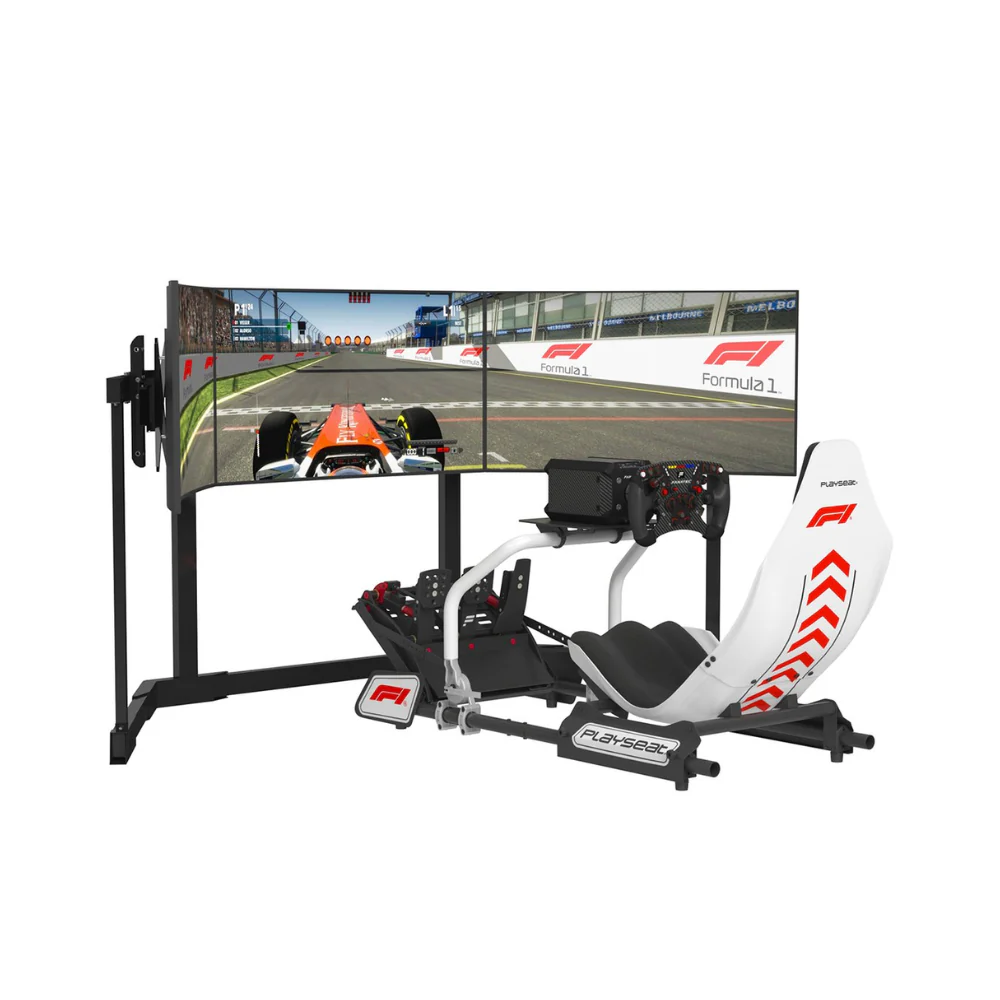
For home enthusiasts, several manufacturers offer officially licensed F1 sim racing cockpits that capture the essential elements without the eye-watering price tag. These rigs focus on ergonomics, adjustability, and compatibility with consumer hardware.
Companies like Playseat have developed official F1 racing simulators in collaboration with Formula 1 teams, offering authentic positioning at accessible price points. The key is finding the balance between authenticity and practicality for your space and budget.
Building or buying an F1 simulator cockpit requires understanding how all the pieces work together. Think of it as assembling a puzzle where each component affects the others.
Your cockpit frame needs rigidity. F1 drivers generate enormous forces through braking and cornering, and your simulator should handle similar inputs without flex. Aluminium extrusion profiles (typically 40x80mm or larger) provide the best balance of strength, adjustability, and weight.
Look for these frame characteristics:
Welded or bolted construction with minimal flex under load
Multiple mounting points for seats, pedals, and wheel bases
Adjustable sections for pedal angle, seat position, and wheel height
Cable management channels or clips
Compatibility with standard mounting patterns
The seat isn't just where you sit; it's your connection point to the entire rig. An F1 simulator cockpit requires either a bucket seat with aggressive bolstering or, better yet, a purpose-built simulator seat with the correct recline angle.
Fixed-back seats offer better support during aggressive driving. Some enthusiasts invest in actual racing seats from retired F1 cars or replicas that match exact specifications. The investment pays dividends in comfort during long racing sessions.
You've got your rig home. Now what? Proper setup transforms a collection of components into a precision driving tool.
Start with the seat. Your backside should sit firmly against the seat back with your spine properly supported. From there, adjust the pedal deck distance so your legs have a slight bend when the brake pedal is fully depressed. This prevents locking your knees and allows for proper modulation.
The steering wheel position should place your hands at approximately shoulder width when gripping the wheel. Your arms should have a comfortable bend, not fully extended. This allows for quick inputs and reduces fatigue.
For an authentic F1 experience, your pedal deck needs precise adjustment. Formula 1 brake pedals require significant pressure (often 100kg or more). Mount your pedals at an angle that allows you to brace your back against the seat while applying maximum force.
Pedal Type |
Mounting Angle |
Pressure Range |
Best For |
|---|---|---|---|
Load Cell |
30-45° |
40-100kg |
F1/GT racing |
Hydraulic |
35-50° |
60-120kg |
Pro simulation |
Potentiometer |
20-35° |
10-30kg |
Entry-level |
The steering wheel should sit at a height where your hands naturally fall when your arms are relaxed. Too high, and you'll tire quickly. Too low, and you'll struggle with visibility on triple screens or VR headsets.
Distance matters equally. You should be able to see your dashboard or button box over the wheel rim without craning your neck. Most F1 simulator cockpit setups position the wheel closer than you'd expect, replicating the compact Formula 1 cockpit environment.
As you progress in sim racing, certain advanced features become increasingly valuable. These separate casual setups from serious training tools.
Motion platforms add physical feedback that helps your brain interpret what the car is doing. Even simple 2-DOF systems that provide pitch and roll can dramatically improve immersion and lap times.
Research in realistic F1 environments demonstrates how motion feedback improves decision-making and reaction times. While that study focused on AI, the principles apply to human drivers equally.
Your F1 simulator cockpit needs sufficient rigidity to support motion actuators without introducing unwanted vibrations. Check weight limits and mounting points before adding motion systems.
Direct drive wheelbases have revolutionised sim racing. For F1 simulation, you want 12Nm minimum, though 17-20Nm provides a more authentic experience during high-speed corners and curb strikes.
The wheelbase mounts directly to your cockpit frame, so ensure your rig can handle the torque without twisting. Some cockpits include dedicated reinforcement plates for high-torque wheelbases.
Triple monitors remain popular for peripheral vision, but VR headsets offer unmatched immersion. Your cockpit design should accommodate either option. Consider these factors:
Monitor mounting for triple screen setups (typically 27-32" displays)
Viewing distance from seat to screens (usually 50-70cm)
Vertical adjustment for proper sight lines
Cable routing to prevent snagging during seat adjustments
When building out your racing simulator setup, remember that display configuration affects your entire cockpit geometry.
One of the joys of owning an F1 simulator cockpit is making it truly yours. Customisation goes beyond aesthetics; it's about optimising every element for your body and driving style.
Modern F1 steering wheels contain dozens of buttons, rotary encoders, and switches. Replicating this functionality requires careful planning. Some enthusiasts mount button boxes on the wheel itself, while others prefer side-mounted panels.
Your customisation options include:
Brake bias adjustment knobs
Multi-position rotary switches for fuel mix, differential, and engine modes
LED displays for telemetry data
Quick-access buttons for pit limiter, DRS, and radio
Custom 3D-printed mounts for specific hardware
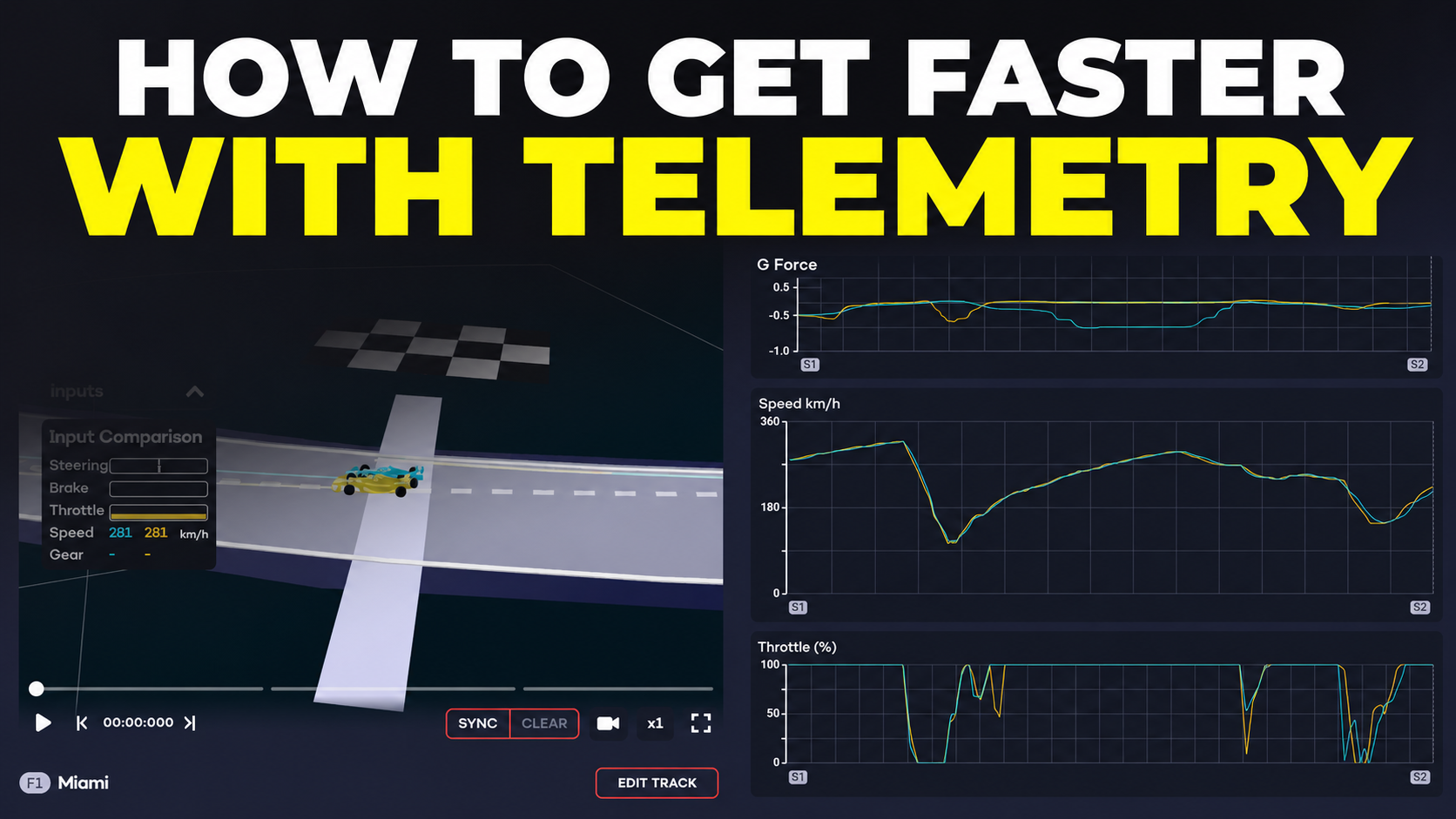
Serious sim racers treat their hobby like professional drivers approach testing. Installing telemetry displays shows real-time data: tyre temperatures, fuel consumption, lap deltas, and more.
Some essential race car simulator features include integration with analysis tools that help identify braking points, optimal racing lines, and areas for improvement.
Before committing to an F1 simulator cockpit, you need to consider the practicalities of installation and daily use.
A complete F1-style rig requires more room than you might expect. Plan for:
Footprint: 2.0m x 1.5m minimum for the cockpit itself
Working space: Additional 0.5m clearance on all sides for entry/exit
Display space: 1.5-2.0m distance for triple monitors or VR play area
Storage: Space for steering wheels, pedal sets, and accessories
Many homes have limited space, especially in apartments or townhouses. Consider foldable or compact designs if space is tight, though these sacrifice some rigidity.
Force feedback wheels and load cell pedals generate significant noise and vibration. If you're in a shared living space or apartment, consider:
Rubber isolation feet to reduce floor transmission
Acoustic panels around your sim racing area
Operating hours that respect housemates or neighbours
Buttkickers or bass shakers instead of large subwoofers
Professional-grade equipment like that used in Formula cockpit simulators based on real F1 car moulds often includes integrated noise dampening, but aftermarket solutions work well for consumer rigs.
Modern sim racing hardware draws significant power. A complete setup might include:
Direct drive wheelbase (150-300W)
Gaming PC (400-800W)
Triple monitors or VR headset (100-400W)
Motion platform if equipped (500-2000W)
Peripherals and accessories (100-200W)
Plan for adequate electrical capacity and cooling. Your cockpit area can become uncomfortably warm during extended sessions, especially with VR headsets. Some enthusiasts install dedicated air conditioning or fans.
With so many options available, how do you choose? Start by honestly assessing your goals, budget, and commitment level.
Budget Range |
What to Expect |
Best For |
|---|---|---|
Under $1,500 |
Entry-level rig, basic seat, compatible with consumer wheels/pedals |
Beginners exploring sim racing |
$1,500-$5,000 |
Solid aluminium frame, quality seat, supports mid-range hardware |
Serious enthusiasts |
$5,000-$15,000 |
Premium construction, official replicas, high-end hardware support |
Dedicated sim racers |
$15,000+ |
Professional-grade, motion platforms, carbon fibre components |
Professional use/serious hobbyists |
Ask yourself these questions:
How often will you use the simulator? Daily practice demands different equipment than weekend racing.
What's your physical space? Measure carefully before buying.
Which sim racing titles do you prefer? F1 games have different requirements than iRacing or Assetto Corsa Competizione.
Do you race competitively? League racing demands reliable, consistent equipment.
Will others use your rig? Adjustability becomes crucial for shared setups.
The sim racing industry evolves rapidly. An F1 simulator cockpit should accommodate future upgrades without requiring complete replacement. Look for:
Universal mounting patterns (80/20 aluminium extrusion)
Adjustable sections that accept various hardware
Expandability for motion systems or additional peripherals
Strong resale value if you upgrade later
Your investment deserves proper care. Regular maintenance extends the life of your F1 simulator cockpit and ensures consistent performance.
Establish a maintenance routine:
Weekly: Check and tighten all bolts and connections
Monthly: Clean contact surfaces and lubricate moving parts
Quarterly: Inspect cables for wear, update firmware
Annually: Deep clean, replace worn components, recalibrate
Aluminium frames resist corrosion but still benefit from occasional cleaning. Use mild detergent and avoid harsh chemicals that might damage anodised finishes.
Most problems are easily addressed:
Frame flex: Add diagonal bracing or upgrade to thicker profiles
Seat wear: Replace padding or entire seat as needed
Loose connections: Use thread locker on critical bolts
Cable damage: Route cables properly with zip ties and protective sleeves
Transitioning to a proper F1 simulator cockpit from a desk-mounted wheel requires adjustment. Your muscle memory needs time to adapt to the new position and feedback.
The reclined position feels awkward initially. Your first few sessions might produce slower lap times as your brain adjusts. This is completely normal.
Give yourself two to three weeks of regular driving to fully adapt. Focus on consistency rather than outright speed during this period. Your times will naturally improve as the position becomes second nature.
An F1 simulator cockpit transforms sim racing from a hobby into a true motorsport experience, offering authentic positioning, professional-grade feedback, and the foundation for serious skill development.
For aspiring esports racers chasing podiums and Formula 1 fans who want the thrill of Grand Prix driving at home, the right cockpit setup makes all the difference.
At Gamer Gear Direct, we understand the passion behind sim racing and stock a comprehensive range of simulation equipment designed to elevate your racing experience.
Our expert team can guide you through selecting the perfect components for your needs, ensuring you get maximum performance and enjoyment from your investment.