






Golfzon Guide: Mastering Virtual Golf in 2025
|
|
Imagine playing a round of golf without worrying about rain, scorching sun, or finding a nearby course. Virtual golf is changing the way Australians approach the game, making it possible to play, train, and compete all year round.
Whether you’re just starting out or aiming to fine-tune your skills, this guide is designed to help you master golf zon and unlock your full potential in 2025.
You’ll discover the latest in Golf Zon technology, learn how to set up your simulator, get practical gameplay tips, and see how data analytics can elevate your practice. Ready to level up your virtual golf experience? Let’s get started.
Curious about how virtual golf is changing the way Aussies play? Golfzon is leading the charge with a system that’s all about realism, accuracy, and pure fun. Whether you’re brand new or you’ve been playing for years, this tech is redefining the game for everyone.

Golfzon is a global leader in virtual golf simulation, known for its cutting-edge simulator systems. What sets it apart? The unique dual-technology approach: radar sensors measure your full-swing shots, while infrared tracks your putts and delicate chips. This combo means you get incredibly accurate feedback for every part of your game.
Unlike other simulators, Golfzon has become the go-to choice in over 60 countries. Its popularity is growing in Australia, where unpredictable weather often gets in the way of a round. With Golfzon, you have the freedom to play, train, or compete any time—rain or shine.
2025 is shaping up to be a big year for Golfzon, thanks to a suite of hardware and software upgrades. You’ll notice improved Doppler radar for better shot tracking, and next-level 3D graphics that make each course feel lifelike. There are now more than 150 international courses to choose from, so you can tee off at St Andrews in the morning and Pebble Beach in the arvo.
One standout is the seamless integration with mobile devices and smartwatches for tracking your stats. Multiplayer and network play are even more robust, letting you join global tournaments or challenge mates online. For a deeper dive into the tech behind these features, check out the Golf Simulator Guide 2025.
So, why should you consider Golfzon for your virtual golf setup? The benefits are hard to ignore:
Play anytime, anywhere, regardless of the weather.
Get instant feedback on over 34 data points with every shot.
Practice both long drives and precise putts with unmatched realism.
Suitable for everyone—whether you’re picking up a club for the first time or you’re a seasoned pro.
With Golfzon, you’re not just simulating golf, you’re getting a flexible, data-driven training tool that helps you play your best game. It’s golf, but smarter and more accessible.
Ready to turn your living room, garage, or business into a state-of-the-art golf zone? Setting up a Golfzon simulator is easier than you might think. Let’s walk through each step so you can enjoy realistic virtual golf right at home or in your venue.

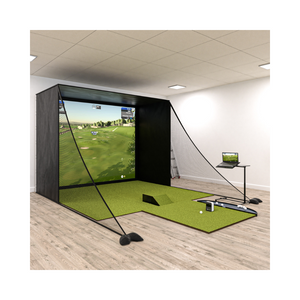
First things first, you’ll need to pick the perfect spot for your Golfzon setup. Got a spare room, garage, or basement? Measure up, as you’ll want at least 3 metres wide by 5 metres long with a ceiling height of 2.7 metres or more for comfortable swings. For commercial spaces, a bit larger is even better.
Next, gather your essentials:
Golfzon launch monitor
Putting sensor
Impact net or screen
Projector and hitting mat
Consider lighting—avoid direct sunlight and opt for even, soft lighting. Soft flooring helps with comfort and safety. If you’re working with a small space, wall-mounted nets and compact mats can make a big difference.
Once your gear arrives, it’s time to get hands-on. Start by carefully unboxing your golf zon Wave system. Place the launch monitor and putting sensor in their recommended positions—usually marked in the manual.
Connect all devices: plug in your monitor, link the projector or screen, and power up the system. Calibration is crucial. Align the radar and infrared sensors as instructed so every shot is tracked accurately. Don’t forget to connect to Wi-Fi or Bluetooth for updates and online play.
If you want extra guidance, check out the Complete Golf Simulator DIY Guide for step-by-step setup and calibration tips tailored to Australian homes.
With hardware sorted, it’s time to dive into the software. Download and install the Vision WAVE program on your computer or compatible device. Make sure you’re running the latest version for the newest features.
Next, grab the Skills App from your app store—available for both Android and iOS. Pair it with your golf zon system to sync shot data, track progress, and access video analysis. Set up user profiles for each player, adjust preferences, and enable automatic firmware updates for a seamless experience.
Even the best tech can hit a snag. If your golf zon sensors seem off, double-check alignment and recalibrate. Connectivity issues? Restart your router or Bluetooth and ensure devices are within range.
For more help, consult the official installation guides or reach out to customer support. There are also active community forums where Aussie users swap tips and solutions. Keep your software up to date to avoid most common hiccups and make sure your virtual golf stays smooth.
Ready to take your Golfzon experience to the next level? Whether you’re sharpening your swing or challenging mates, mastering the virtual side of Golfzon is all about making the most of its technology, data, and social features. Let’s break down how you can get the most from every session.

With Golfzon, you have a world of choice at your fingertips. Dive into practice mode to focus on specific skills, or switch to play mode for a realistic round on one of over 150 international courses. Want to mix things up? Customise your experience by tweaking weather, course difficulty, or tee settings.
Challenge yourself in competition mode, where you can join global network tournaments or climb leaderboards. The variety means there’s never a dull moment. You can even host a friendly match at home or online, making Golfzon ideal for both solo sessions and group fun.
Golfzon stands out for its in-depth data tracking. Each shot is analysed across 34+ metrics, including ball speed, launch angle, spin, club face angle, and tempo. Instantly see what’s working and where you need to adjust.
Use this feedback to refine your swing mechanics in real time. The Skills App tracks your stats over weeks or months, helping you spot trends and set new personal bests. Compare your performance to global averages, or focus on beating your own milestones. With Golfzon, improvement is visible and measurable every step of the way.
Building a solid practice routine with Golfzon is key to steady progress. Structure your sessions to include full swings, approach shots, and putting. The system’s video analysis tools let you break down each movement, while measurable goals keep you motivated.
Try incorporating drills recommended by PGA professionals, or explore new techniques you discover in The Ultimate Guide to Indoor Golf. Set milestones for accuracy, distance, or consistency, and use the Skills App to track your growth. Over time, you’ll see just how much your commitment pays off.
Golfzon is more than just solo practice. Invite friends for a match, either in person or through the online network. Compete in official tournaments or casual games, then share your best highlights and achievements via the app or on social media.
Getting involved in the virtual golf community can be incredibly motivating. You’ll find new rivals, supportive peers, and plenty of inspiration to keep pushing your limits. Whether you’re chasing leaderboard glory or just having a laugh with mates, golf zon brings people together in a fresh, interactive way.
Ready to take your Golfzon skills up a notch? Now that you’ve got the basics sorted, let’s dig into the advanced strategies that can really sharpen your game. Whether you’re chasing lower scores or just love the challenge, these tips will help you get more from every session.
Unlock the power of golf zon’s data to fine-tune your swing. Start by reviewing your shot metrics after each session. Look for patterns in your ball flight, swing path, and putting accuracy. Are you missing left? Is your tempo consistent? Use the real-time feedback to pinpoint weak spots.
Slow-motion playback is a game changer. Watch your swing frame by frame, then compare it to your best shots. Set up a feedback loop: review, adjust, and swing again. Over time, you’ll see measurable improvements. Consistent practice with golf zon data leads to smarter, more efficient training.
Personalise your Golfzon sessions for maximum engagement. Tweak camera angles, shot tracers, and display settings to suit your style. Dive into advanced training modules and mini-games for variety. If you’re upgrading your setup, explore tips from the Home Golf Sim Guide: Expert Tips to get the most out of your environment.
Try different virtual environments to keep things fresh. Some golfers love simulating famous courses, while others prefer challenge-based games. Integrate compatible third-party analysis tools if you want even deeper insights. The more tailored your setup, the more you’ll enjoy every round.
Set clear goals to keep your Golfzon journey on track. Start with short-term targets, like improving your putting stats, and build up to long-term milestones, such as mastering a tough course. Use achievements, badges, and leaderboards for that extra push.
Schedule regular practice and invite friends for friendly competitions. Celebrate every win, no matter how small. Sharing your progress makes the experience more rewarding. With a consistent routine and a supportive community, you’ll stay motivated and keep improving.
Looking to take your Golfzon experience to a new level in 2025? The right accessories and upgrades can make your sessions more immersive, accurate, and enjoyable. Whether you’re perfecting your swing at home or running a commercial simulator, these essentials will help you get the most out of your Golfzon setup.
The right accessories can transform your Golfzon sessions from basic to brilliant. Start with a high-quality golf mat that mimics real turf, giving your shots authentic feedback. Pair it with a sturdy net to catch even the most powerful drives, keeping your space safe.
For visuals, a full HD projector and large screen create an immersive, lifelike environment. Comfortable, ergonomic seating ensures you stay relaxed during longer practice or social rounds. Want to stay organised? Consider extras like ball trays, club racks, and adjustable tees. These small touches help your Golfzon setup feel like a real pro’s studio, no matter your available space.
Golfzon tech is evolving fast, and 2025 is packed with new features. Upgraded sensor modules and advanced radar units now deliver even sharper shot tracking, especially for putting and chip shots. The latest Vision WAVE software brings more global courses, improved 3D graphics, and smoother integration with VR or AR accessories if you want to experiment.
Firmware updates are a must, unlocking new training modes and enhanced multiplayer features. Before upgrading, check your Golfzon system’s compatibility with the newest hardware and software. If you’re setting up a new space or expanding, the Golfzon Resource Center offers planning tips and setup guides to help you get it right.
Keeping your Golfzon equipment in top shape means more reliable data and longer-lasting gear. Regularly clean sensors and mats to prevent dust build-up, which can affect accuracy. Make it a habit to install software and firmware updates, as these often include bug fixes and performance boosts.
Store your Golfzon accessories safely when not in use to avoid damage. For any troubleshooting or technical issues, the Golfzon Support and Service page offers step-by-step guides and direct help. Staying on top of maintenance ensures your virtual golf experience remains as smooth and realistic as possible.


