






Indoor Golf Simulator Guide: Master Your Game in 2025
|
|
Imagine stepping into your own lounge room and perfecting your golf swing any day you like, rain or shine. With an indoor golf simulator, this dream is now a reality for golfers in 2025.
This guide is here to help you master your game using the latest technology. You’ll discover the benefits of indoor simulators, learn about key components, get step-by-step setup advice, see how top brands compare, and pick up expert tips for real improvement.
Ready to unlock year-round play and take your skills to the next level? Let’s get started.
Imagine being able to play 18 holes or work on your swing, regardless of the weather or time of year. That’s the promise of the indoor golf simulator in 2025. Let’s break down why this technology is transforming the game for everyday golfers like you.

Since 2020, the indoor golf simulator has exploded in popularity, becoming a staple in homes across Australia. No longer do you have to worry about rain washing out your plans or courses shutting for the winter. Now, you can tee off any time, right in your living room or garage.
What’s behind this trend? Golfers are chasing more immersive, data-rich experiences. With simulators now more affordable than ever, everyday players can access advanced features once reserved for pros. It’s not just about convenience—it’s about having the tools to improve year-round. Many golfers have seen real improvement in their skills just by practising indoors during the off-season.
An indoor golf simulator gives you instant feedback after every swing. You’ll see stats like club speed, launch angle, and spin, helping you understand what’s working and what needs tweaking. This data-driven approach fuels faster improvement, whether you’re a beginner or a seasoned player.
Here’s why players of all ages and abilities are jumping on board:
Play virtual rounds on legendary courses with friends or solo
Track your progress with detailed stats and shot analysis
Enjoy fun, fitness, and entertainment beyond traditional practice
Engage the whole family with games and challenges
No matter your skill level, the indoor golf simulator turns practice into an engaging, rewarding experience.
The global indoor golf simulator market is on a tear, projected to top $3.5 billion by 2025. More homes and commercial venues are installing simulators, making advanced golf tech accessible to a wider audience. You’re not just getting a gadget—you’re tapping into a booming industry.
Tech is moving fast. AI-powered coaching and virtual reality are adding new layers of realism. Usage is climbing among juniors and seniors alike, proving this isn’t just a trend for the pros. For a deeper dive into adoption rates and market impact, check out the NGF White Paper on Golf Simulators.
The future of golf is digital, and the indoor golf simulator is leading the charge.
Setting up an indoor golf simulator is a bit like assembling your dream toolbox. Each piece matters, and getting it right means you’ll enjoy a more realistic, satisfying game. Let’s break down exactly what you’ll need for the ultimate setup at home.
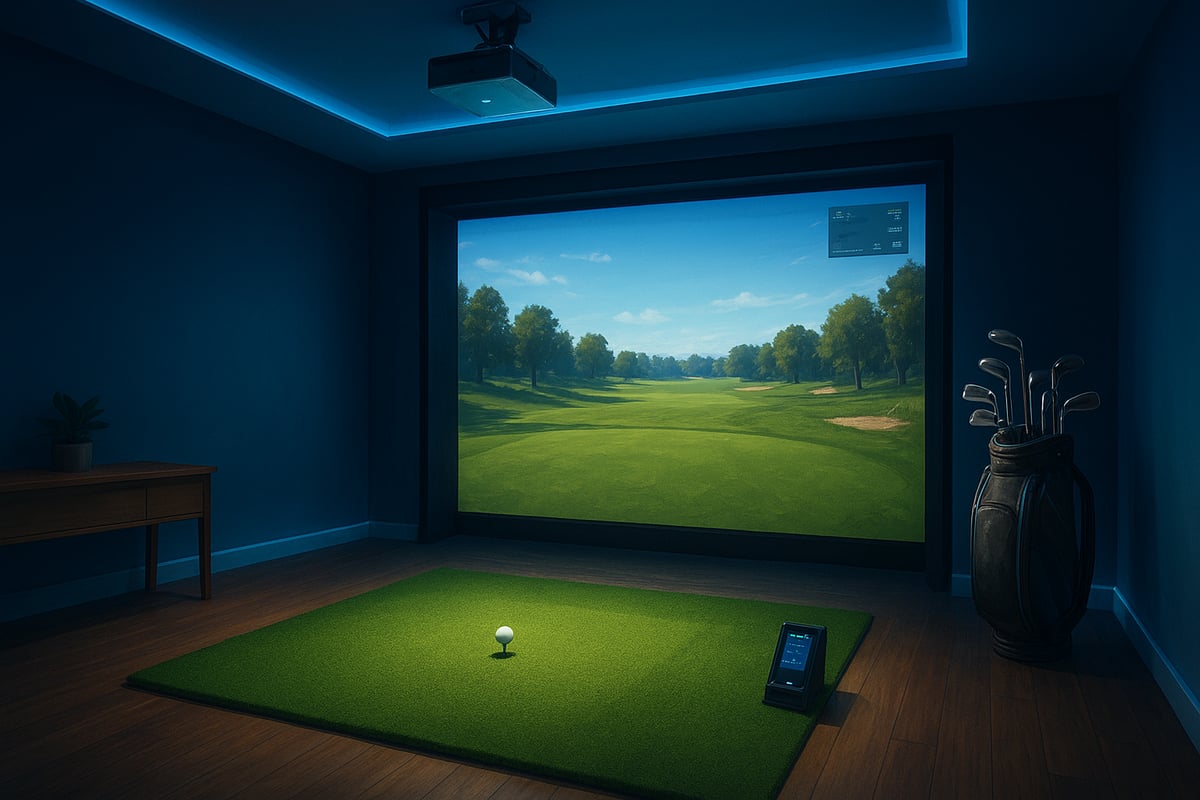
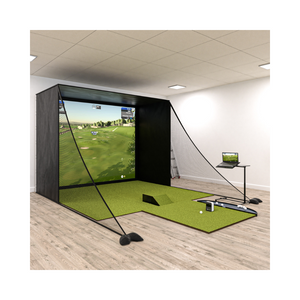
The backbone of any indoor golf simulator is its hardware. Start with a reliable launch monitor, which measures your swing and ball data with impressive accuracy. Popular models include SkyTrak and FlightScope. You’ll also need a sturdy impact screen or enclosure for visuals and safety, plus a high-lumen projector or a large display to bring the course to life.
Don’t forget a quality golf mat to mimic the feel of real turf and protect your floors. Optional add-ons like a ball return system, netting, or a sound system can take your experience up a notch. If you want to browse different options, check the Golf Simulators Collection for a range of setups to match your needs.
Great hardware is only half the story. The software you choose for your indoor golf simulator unlocks virtual courses, driving ranges, and fun skill games. Look for realistic graphics, detailed stat tracking, and multiplayer support to keep things interesting.
Compatibility matters too. Make sure the simulation software works with your devices and operating systems. Some programs, like TGC 2019 or E6 Connect, come with regular updates and new courses, so you’ll never run out of places to play. The right software turns your simulator into a data-rich training tool and an entertainment hub all in one.
Before you start swinging, measure your space. Most indoor golf simulator setups need at least 3 metres high, 3 metres wide, and 5 metres long for a comfortable, safe swing. Ceiling height is especially important if you plan to use your driver.
Good lighting is key, but avoid glare on your screen. Stable power and reliable internet keep everything running smoothly, especially for software updates or online play. Pay attention to ventilation and noise, especially if your simulator is near shared living areas. Planning your room carefully makes your practice time more enjoyable.
Once your basics are in place, accessories can elevate your indoor golf simulator experience. Swing cameras and club sensors add another layer of feedback, while putting analysis tools help you fine-tune your short game.
Consider upgrading your golf mat or screen for a more lifelike feel as your skills improve. Custom enclosures can transform a spare room or garage into a dedicated golf haven. With so many options available, your simulator setup can grow with you, supporting both fun and serious practice for years to come.
Setting up your own indoor golf simulator can seem overwhelming at first, but breaking it down into clear steps makes the process manageable and even fun. Let’s walk through each stage so you can tee off indoors in no time.

Before you start shopping for an indoor golf simulator, measure your available space. Use a tape measure to check the ceiling height, width, and length of the room. Ideally, you’ll want at least 3 metres high, 3 metres wide, and 5 metres long.
Look around for any obstacles like hanging lights, ceiling fans, or windows that could interfere with your swing. Decide if your setup will be permanent, semi-permanent, or completely portable, depending on your space and lifestyle. Garages, basements, and even living rooms can work surprisingly well.
Imagine transforming a spare bedroom into your personal golf studio. With a bit of creativity, almost any space can become the perfect spot for your indoor golf simulator.
Choosing the right indoor golf simulator package is about matching your goals and budget. Decide if you want an all-in-one bundle or prefer to build a custom system from separate components.
Consider what features matter most to you. Are you after realistic ball tracking, a wide selection of virtual courses, or detailed swing analysis? Compare launch monitor accuracy, available software, and included extras like mats and nets.
Entry-level options start around $2,000–$5,000, while premium setups can exceed $10,000. Take note of warranty and support, as well as how easy it will be to upgrade in the future. Your indoor golf simulator should grow with your game.
Ready to bring your indoor golf simulator to life? Start by safely mounting the impact screen or net, ensuring it’s stable and positioned correctly. Set up your projector or display and align it for a crisp, immersive image.
Next, calibrate your launch monitor, following the manufacturer’s guidelines for accuracy. Install simulation software on your preferred device, whether it’s a laptop, tablet, or dedicated console.
Don’t forget to test all connections, including power, WiFi, and device compatibility. If you hit any snags, check for troubleshooting tips in the manual or online forums. Soon, you’ll be swinging away with confidence in your own indoor golf simulator.
Now it’s time to take your indoor golf simulator experience to the next level. Fine-tune your projector’s position and settings for vivid, lifelike visuals. Upgrade to a high-quality mat for a more realistic turf feel and to protect your flooring.
Add ambient lighting and perhaps a sound system for extra immersion. Organise your clubs, balls, and accessories for easy access, and do a quick safety check to make sure your netting and screens are secure.
If you’re looking to enhance your setup further, browse Golf Simulator Accessories for swing cameras, putting tools, and custom enclosures. Every detail helps make your indoor golf simulator more enjoyable and authentic.
Ready to compare the top indoor golf simulator options for 2025? Let’s break down the most trusted brands, essential features, and which models suit your goals best. Whether you’re just starting out or looking to level up your home practice space, knowing what sets each simulator apart will help you make the right choice for your game.
When it comes to choosing an indoor golf simulator, the brand can make a world of difference. Trackman is famous for pinpoint accuracy and pro-level data, making it a top pick for those serious about golf analytics. SkyTrak stands out for its blend of value and versatility, perfect for home users who want professional results without the hefty price tag. If you’re curious about what makes SkyTrak unique, check out The Ultimate SkyTrak Launch Monitor Guide for an in-depth look at its features. FlightScope uses advanced radar to give you detailed shot analysis, while Uneekor, Golfzon, and Rapsodo each bring innovative tech and flexible price points. Each brand offers a strong software ecosystem and reliable community support, so you’ll find an indoor golf simulator that fits your needs.
With so many indoor golf simulator models out there, how do you know which one ticks all your boxes? Let’s make it easier with a quick comparison:
Brand |
Launch Monitor Tech |
Software Compatibility |
Course Library |
Multiplayer |
User Interface |
Support/Warranty |
|---|---|---|---|---|---|---|
Trackman |
Doppler Radar |
Extensive |
200+ |
Yes |
Pro-level |
Excellent |
SkyTrak |
Photometric |
Wide |
100+ |
Yes |
User-friendly |
Great |
FlightScope |
Radar |
Wide |
80+ |
Yes |
Intuitive |
Strong |
Uneekor |
Photometric |
Wide |
100+ |
Yes |
Modern |
Reliable |
Golfzon |
Multi-Sensor |
Proprietary |
150+ |
Yes |
Sleek |
Good |
Rapsodo |
Radar |
Growing |
60+ |
Yes |
Simple |
Good |
This table highlights the key differences, helping you zero in on the indoor golf simulator that matches your wish list.
Let’s get practical. Which indoor golf simulator is right for you? Here’s a quick breakdown:
Entry-level: SkyTrak or Rapsodo, great for beginners or casual users who want reliable data without a huge spend.
Mid-range: Uneekor or FlightScope, offering enhanced features and realistic feedback for serious practice.
Premium: Trackman or Golfzon, perfect for advanced players wanting pro-grade analysis and custom enclosures.
Commercial vs. Residential: Golfzon and Trackman shine in academy or commercial setups, while SkyTrak and Uneekor are favourites for home garages or living rooms.
No matter your budget, there’s an indoor golf simulator tailored for your goals and space.
Want to get the most out of your indoor golf simulator? Let’s break down practical ways you can use this tech to sharpen your skills, have more fun, and see real improvement, whether you’re a newbie or a seasoned player.
One of the biggest perks of an indoor golf simulator is instant, detailed feedback. You can see your club path, face angle, ball spin, and speed after every shot. This data takes the guesswork out of practice.
Set clear, measurable goals using the built-in analytics. Want to improve your driver accuracy or dial in your wedge spin? Use targeted drills and skill games to work on those weak spots. Most simulators let you track your progress over time, so you’ll see just how much you’re improving.
By adapting your practice routine based on real data, you’ll build confidence and consistency faster than ever.
With an indoor golf simulator, you’re no longer stuck hitting into a net. Play virtual rounds on some of the world’s best courses from your lounge room. You can practise tough lies, adjust weather conditions, and try out different shot types without leaving home.
Invite friends or family for multiplayer sessions or join online tournaments to add a competitive spark. These features aren’t just fun—they help you build smarter course strategies and test your skills under pressure.
Ever dreamed of playing Augusta or St Andrews? Now you can, rain or shine, any time you like.
Want to make your simulator sessions count? Schedule regular, focused practice just like you would at the driving range. Mix up your sessions with skill games, on-course play, and data review.
Combine indoor golf simulator practice with real-world rounds for the best results. Customise your simulator’s settings for true-to-life ball flight and putting speeds. Use video swing analysis and even integrate coaching if your system supports it.
Explore new features and keep your experience fresh by checking out the latest Golf Simulation Software Options for upgrades and course additions.
If you notice your “simulator swing” feels different from your real course swing, don’t stress. It’s common, and you can bridge the gap by mixing simulator and outdoor sessions.
Minimise home distractions by dedicating a quiet space for practice. Calibrate your indoor golf simulator regularly and maintain your hardware for accurate, reliable results.
By staying consistent and proactive, you’ll overcome these challenges and make the most of every session.
Picture yourself stepping into the future of golf, where your practice space is as smart as your phone and as immersive as a real course. The pace of change in indoor golf simulator technology is fast, and 2025 is shaping up to be a landmark year for innovation. So, what should you expect, and how can you make sure your setup stays ahead of the curve?
The indoor golf simulator landscape is being transformed by cutting-edge tech. Imagine AI-powered swing analysis that offers instant coaching tips after every shot. Virtual and augmented reality are making practice sessions feel like you're actually walking the fairways of Pebble Beach or St Andrews.
Portable and wireless launch monitors mean you can set up your simulator almost anywhere, whether that's a dedicated room or a shared living area. Smart home integration is also taking off, letting you use voice commands to switch courses or adjust settings. VR goggles are now offering full 360° course views, making every round more engaging.
If you're keen to explore the latest research and momentum behind these trends, check out Indoor Golf: Market & Momentum, which highlights how these advancements are driving the indoor golf simulator market forward.
What does the next-level indoor golf simulator experience look like? For starters, online communities are booming. You can join global tournaments, compete with friends, or even build your own custom avatar for a truly personal touch.
Enhanced realism is also on the rise with haptic feedback, giving you the sensation of impact and turf feel. Predictive analytics are now helping tailor your improvement plans, using simulator data to suggest practice routines that suit your goals.
According to industry projections, simulator use is expected to grow by 15 percent annually through 2025. This means more features, more players, and even more ways to enjoy your indoor golf simulator setup.
As the popularity of indoor golf simulator setups increases, so does the focus on sustainability and accessibility. Manufacturers are using eco-friendly materials in mats and enclosures, helping reduce the environmental impact of your home golf studio.
Adaptive equipment is making simulators more inclusive, so golfers of all abilities can join in. Lower entry costs are opening the door for more families, juniors, and seniors to experience year-round play at home.
Community programs and partnerships with schools are expanding access even further. When choosing your indoor golf simulator, look for brands investing in future-proof materials and inclusive design, so your setup stays relevant for years to come.


