





FlightScope Mevo Plus Review: Your Complete Guide
|
|
If you're serious about improving your golf game or building a home golf simulator, you've probably heard about the FlightScope Mevo Plus.
This portable launch monitor has been making waves in the golf simulation world since its release, and for good reason.
It's not the cheapest option out there, but it packs some seriously impressive technology into a surprisingly compact package.
From weekend warriors tracking swing improvements to dedicated sim golfers chasing accurate indoor practice data, understanding what the FlightScope Mevo Plus offers can help you decide if it's the right fit for you.
The launch monitor market is crowded with options ranging from budget-friendly models to professional-grade systems costing tens of thousands of dollars.
So where does the FlightScope Mevo Plus fit in?
This device sits comfortably in the mid-to-upper range, offering professional-level data at a more accessible price point. Unlike cheaper alternatives that use photometric technology, the official FlightScope Mevo Plus utilises 3D Doppler radar tracking, which provides more comprehensive and accurate data.
Here's what sets it apart from the competition:
16 data parameters in the base model
Full bag tracking from driver to wedges
Indoor and outdoor functionality with minimal space requirements
Automatic video recording that syncs with your shot data
Simulation software compatibility for virtual golf rounds
The portability factor cannot be overstated. Weighing just over a pound and about the size of a large smartphone, you can literally fit this in your golf bag and take it to the range, use it indoors, or set it up in your backyard.

You're probably wondering how such a small device can deliver professional-grade information. The secret lies in the radar technology that FlightScope has been perfecting for years in their tour-level products.
The 3D Doppler radar sends out radio waves that bounce off your golf ball and club, measuring tiny shifts in frequency to calculate speed, direction, and spin. This happens thousands of times per second, creating an incredibly detailed picture of what's happening during your swing.
What does this mean for you? More reliable data compared to camera-based systems, especially outdoors where lighting conditions can affect accuracy. The FlightScope Mevo Plus doesn't care if it's bright sunshine or overcast skies; it'll track your shots consistently.
Let's talk about what really matters when you're setting up a golf simulator at home. You want accurate data, realistic gameplay, and a system that doesn't require a PhD to operate.
The base model tracks these crucial parameters:
Data Point |
What It Tells You |
Why It Matters |
|---|---|---|
Ball Speed |
Initial velocity off clubface |
Direct correlation to distance |
Club Speed |
How fast you're swinging |
Power generation indicator |
Smash Factor |
Efficiency of contact |
Quality of ball striking |
Launch Angle |
Ball's takeoff trajectory |
Optimisation for each club |
Carry Distance |
How far it flies |
Actual usable yardage |
Spin Rate |
Ball rotation |
Shot shape and stopping power |
The integration with E6 Connect simulation software transforms this from a practice tool into a full-fledged simulator experience. You can play famous courses, compete in challenges, or just work on your game with immediate feedback.
Here's something I find particularly valuable: the automatic video recording feature. Every time you hit a shot, the FlightScope Mevo Plus captures video from your smartphone or tablet and syncs it with the shot data.
Why does this matter? Because seeing your swing alongside the numbers helps you understand cause and effect. If your launch angle suddenly drops, you can review the video and see that you came over the top. Numbers are great, but visual confirmation accelerates improvement.
The split-screen view lets you compare two swings side-by-side, making it easier to spot differences when you're making adjustments. This is the kind of feedback that used to require expensive coaching sessions.
One common concern I hear is about space requirements. How much room do you actually need to use the FlightScope Mevo Plus effectively?
For outdoor use, you'll want:
8-10 feet behind the ball for optimal positioning
Clear ball flight path without immediate obstructions
Level ground for the device and hitting area
Indoor setups require more careful planning. The device needs to be positioned correctly to capture both club and ball data, which means you'll need adequate depth in your simulator space. Some users have reported challenges in smaller rooms, particularly when using longer clubs.
Here's a practical consideration: the FlightScope Mevo Plus works best when it can track the ball for at least a few feet of flight. This is where impact screens and net setups become crucial for indoor use. You're creating an environment that allows the radar to do its job while keeping golf balls from damaging your walls.
Getting accurate readings isn't complicated, but it does require following some basic guidelines. The device needs to be level, positioned at the correct distance from the ball, and aimed properly.
Temperature can affect radar performance, so the FlightScope Mevo Plus includes environmental compensation. It adjusts readings based on altitude and temperature, ensuring your 150-yard shot in summer doesn't become a 145-yard shot in winter just because of air density changes.
The accuracy specifications are impressive:
Measurement |
Accuracy |
|---|---|
Ball Speed |
±0.5 mph |
Carry Distance |
±1 yard (indoor), ±2 yards (outdoor) |
Club Speed |
±1 mph |
Spin Rate |
±100 rpm |
These tolerances are tight enough for serious practice work while being realistic for the price point. You're not getting million-dollar tour truck precision, but you're getting reliable data that you can trust for improvement.
The FlightScope Mevo Plus doesn't just spit out numbers on a small screen. It connects to your smartphone, tablet, or computer via Wi-Fi, displaying everything through the FlightScope Skills app or third-party simulation software.
The Skills app provides:
Real-time shot data display
Practice modes and games
Shot history and trend analysis
Video review capabilities
Skills challenges to make practice engaging
But the real fun starts when you connect it to simulation software. E6 Connect is the most popular choice, offering photorealistic courses and competitive gameplay. According to detailed reviews from Rain or Shine Golf, the integration works seamlessly, providing responsive gameplay that makes indoor practice actually enjoyable.
Other compatible software options include TGC 2019, GS Pro, and Creative Golf. Having choices means you can find the simulation experience that matches your preferences and budget.
The mobile experience deserves special mention because this is how you'll interact with the device most of the time. The app interface is clean and intuitive, showing your shot data immediately after impact.
You can customise which parameters display on the main screen, so if you're working on specific aspects of your swing, those numbers are front and center. The historical data tracking lets you see progress over weeks and months, which is genuinely motivating when you notice your average driver carry distance creeping up.

Let's address the elephant in the room: the FlightScope Mevo Plus isn't cheap. So how does it stack up against other options in the market?
In the budget category, you'll find units under $500 that track basic metrics but often sacrifice accuracy and reliability. These might be fine for casual use, but serious simulation enthusiasts typically outgrow them quickly.
Mid-range competitors include the SkyTrak offer different advantages:
SkyTrak
Camera-based tracking
Excellent simulation compatibility
Strong indoor performance
Limited outdoor functionality
FlightScope Mevo Plus
Radar tracking technology
Indoor and outdoor versatility
Comprehensive data package
Professional-grade accuracy
The choice really depends on your priorities. As Golf Sim Lab Pro notes in their review, outdoor performance is where the FlightScope Mevo Plus really shines, making it ideal if you want a device that works everywhere.
Reading specifications is one thing; understanding real-world performance is another. What's it actually like using the FlightScope Mevo Plus for regular practice and simulation?
The good news: shot registration is reliable and quick. There's minimal delay between hitting and seeing your data, which keeps practice sessions flowing naturally. The device rarely misses shots when positioned correctly, though extremely mishit shots or topped balls might occasionally not register.
Battery life holds up well for typical practice sessions. You'll get several hours of use on a charge, though serious simulation marathons might require plugging in. The device charges via USB-C, which is convenient since you probably have multiple cables around.
No device is perfect, and the FlightScope Mevo Plus has some quirks worth knowing about:
Space constraints indoors: Some users with smaller rooms struggle with positioning. The solution often involves careful measurement and potentially adjusting your setup configuration.
Initial learning curve: Getting optimal positioning takes some trial and error. Following the setup guide carefully saves frustration.
Software updates: Occasionally, firmware updates are needed for optimal performance. Keeping everything current prevents compatibility issues.
The online community around this device is active and helpful. If you run into issues, chances are someone else has encountered and solved the same problem. Forums and user groups provide valuable troubleshooting assistance beyond official support channels.
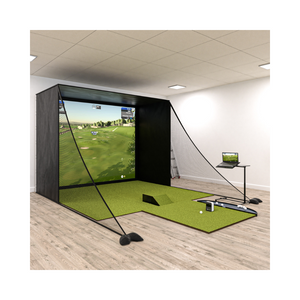
If you're planning a full simulator build, the FlightScope Mevo Plus is just one component. You'll also need to consider your impact screen, projector, hitting mat, and enclosure.
Essential components for a complete setup:
Quality hitting mat with realistic turf feel
Impact screen sized for your space
Projector with adequate brightness and resolution
Enclosure or netting for safety and ball containment
Computer or tablet for running simulation software
Sound system for immersive gameplay (optional but recommended)
The total investment varies widely based on quality and features. Entry-level setups might run $3,000-$5,000 all-in, while premium configurations can exceed $15,000. The FlightScope Mevo Plus sits comfortably in setups across this entire range because the data quality justifies inclusion even in high-end builds.
Similar to how sim racing beginners need to understand component selection, golf simulator builders benefit from understanding how each piece contributes to the overall experience. The launch monitor is your data source, but the other components create the immersive environment.
What's it like owning a FlightScope Mevo Plus over months and years? Maintenance requirements are minimal, which is a significant advantage.
The device is solidly built with no moving parts to wear out. Regular care involves:
Keeping the radar lens clean
Storing in a protective case when not in use
Ensuring software stays updated
Protecting from extreme temperatures and moisture
FlightScope's customer support receives generally positive reviews, with responsive assistance for technical issues. The warranty coverage provides peace of mind, though most users report reliable operation without needing support.
Firmware updates occasionally add features or improve performance, meaning your device actually gets better over time rather than becoming obsolete. This is the kind of future-proofing that makes a higher initial investment more palatable.
Launch monitors tend to hold value reasonably well in the used market, particularly quality units like the FlightScope Mevo Plus. If you decide to upgrade or change direction, you can typically recoup a decent percentage of your investment.
This differs significantly from rapidly depreciating technology. Golf simulation gear maintains value because the core functionality doesn't become outdated quickly. A three-year-old FlightScope Mevo Plus still tracks shots just as accurately as a brand-new one.
After all this information, who is the ideal FlightScope Mevo Plus buyer? Let's be specific about who benefits most from this investment.
You should seriously consider it if:
You practice regularly and want meaningful feedback
You're building or upgrading a home golf simulator
You want a device that works indoors and outdoors
You value accurate data over gimmicky features
You're willing to invest in quality simulation equipment
You have adequate space for proper setup
You might want alternatives if:
Your budget is very limited
You only plan occasional casual use
You exclusively play indoors with limited space
You're brand new to golf and unsure about commitment
You don't care about detailed data analysis
The FlightScope Mevo Plus occupies that sweet spot between hobbyist and professional gear. It's serious equipment that delivers reliable results without requiring a second mortgage. For dedicated golf simulation enthusiasts, that positioning makes it an attractive option worth investigating further through resources like comprehensive launch monitor guides.
The market for launch monitors continues evolving, with new models and updates appearing regularly. The FlightScope Mevo Plus has maintained relevance since release because the fundamental technology remains sound and the feature set addresses real user needs.
Price fluctuations happen, so watching for deals makes sense if you're ready to buy. Occasionally, significant discounts appear that make the investment even more attractive. Timing your purchase during promotional periods can save hundreds of dollars.
What ultimately matters is whether the device helps you improve and enjoy golf more. For many users, the answer is a resounding yes. The combination of portability, accuracy, and versatility creates a package that serves multiple purposes across different practice environments.
Understanding your specific needs and how the FlightScope Mevo Plus addresses them is crucial for making the right decision. It's not the perfect solution for everyone, but for golfers serious about improvement and simulation enthusiasts wanting quality data, it delivers exceptional value.
The FlightScope Mevo Plus represents a significant investment in your golf simulation experience, offering professional-grade data accuracy and versatile functionality that works both indoors and outdoors. Whether you're building a complete home simulator or simply want reliable practice feedback, choosing quality equipment makes all the difference. At Gamer Gear Direct, we understand the importance of selecting the right simulation gear for your needs, and our team is ready to help you create the perfect golf simulation setup with expert guidance and comprehensive support.


