- Description
- Specifications
- What's In The Box?
- Reviews
- Warranty
- Shipping
- 30 Day Returns
- Why Buy From Us?
Soar the skies with the Turtle Beach VelocityOne Flightstick
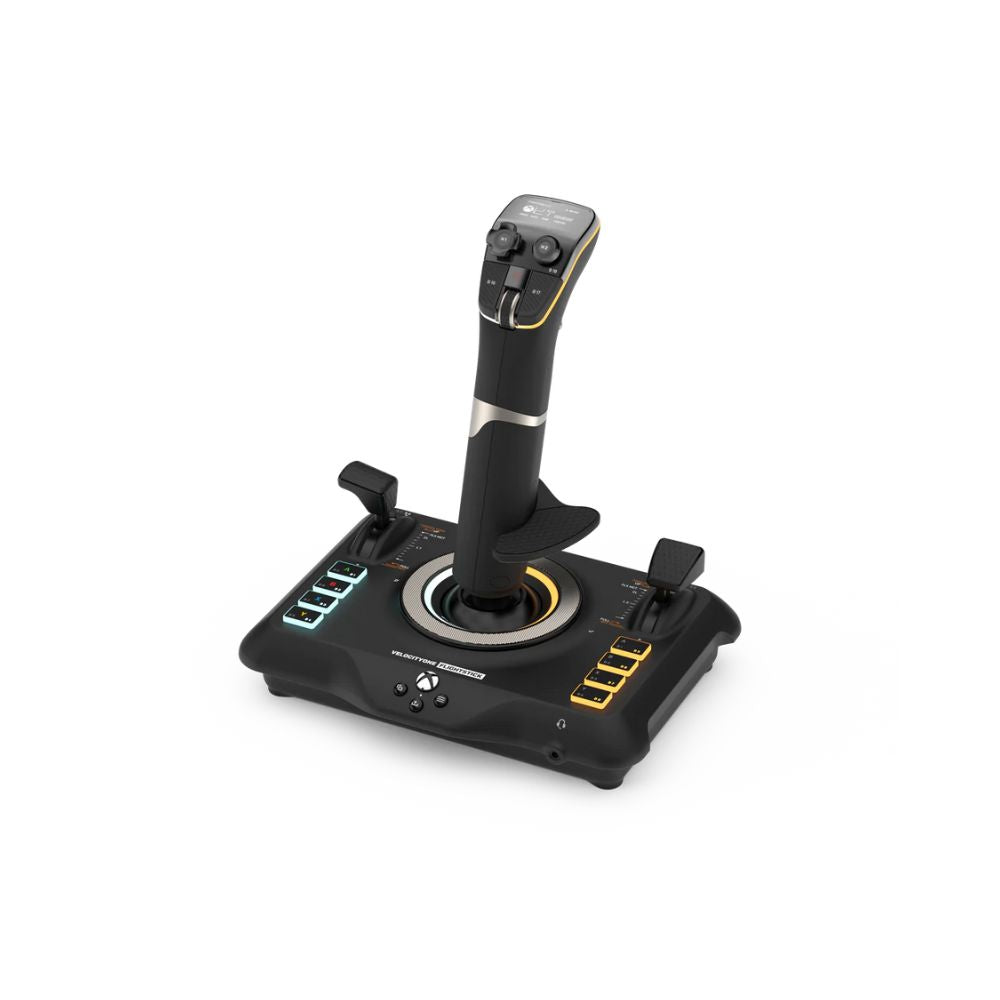
The Turtle Beach VelocityOne Flightstick for Xbox Series X|S, Xbox One & Windows PCs equips you with immersive, accurate controls for air and space flight simulation & combat games on Xbox and PC.
Ultra-smooth main stick provides precise control, and two multi-function levers control main engine power and adjustment of control surfaces.
A precise nano trim wheel allows for fine tuning of attitude and the OLED Flight Management Display makes for easy adjustments to control profiles.
With 27 programmable buttons, a rapid-fire trigger and more, you’re well-armed with a multitude of controls.
Turtle Beach VelocityOne Flightstick key features
- Enjoy ultra-accurate control with high-precision, non-contact main axes
- Customise your flight with multi-function throttle and flap levers
- With 27 programmable buttons, 8 axes, a POV hat, and a rapid-fire trigger, you’ve got everything you need right at your fingertips
- Integrated OLED Flight Management Display keeps all your flight details visible and easy to access.
- Navigate through settings with an intuitive flight configuration wheel.
- Compatible with both Xbox and PC, so you can fly wherever you want.
- Adjust the main stick sensitivity to precisely target enemies or nail those tricky landings.
- Plug in any 3.5mm headset to enjoy Turtle Beach’s renowned audio features like Superhuman Hearing
The Turtle Beach VelocityOne Flightstick features 8 high-precision axes
With 8 high-precision axes, the Turtle Beach VelocityOne Flightstick offers incredibly smooth and responsive control.
Thanks to the high-resolution, contactless sensors, you get ultra-precise movements that feel natural and intuitive—perfect for those critical moments when accuracy is key.
Plus, these sensors are designed to last, ensuring your flightstick maintains its sharp performance over time.
This flightstick also features a nano trim wheel, which lets you fine-tune your aircraft’s attitude with pinpoint accuracy.
And for those who love space sims, the analog POV hat is a game-changer.
It allows for precise adjustments to your cockpit views or fine control of your strafe thrusters, giving you a competitive edge in those intense interstellar dogfights or when docking at a space station.
With 27 programmable buttons, VelocityOne Flightstick puts all the control at your fingertips
Of course, it’s not just about having buttons—it’s about having the right buttons, exactly where you need them.
Whether you're managing complex flight manoeuvres or need quick access to essential functions, this flightstick has you covered.
Let’s break it down: you get an 8-way digital POV hat that makes switching views or navigating menus a breeze.
Perfect for keeping an eye on your surroundings or making quick adjustments without taking your hands off the controls.
The rapid-fire trigger is ideal for those moments when you need to act fast.
Need more? The flightstick also features stick-mounted buttons for quick thumb access, and dual throttle levers with detents, giving you that satisfying “click” when you move between different power settings.
And let’s not forget the 8 programmable base buttons—these can be customised to suit your unique flying style, ensuring every function you need is right where you want it.
Multifunction throttle & flap levers
The Turtle Beach VelocityOne Flightstick is all about giving you that hands-on, realistic flying experience.
One of its standout features is the ultifunction throttle and flap levers.
With two dedicated levers, you can easily adjust the main engine throttle and control the flaps or secondary control surfaces with precision, making every flight feel incredibly real.
But the customisation doesn’t stop there!
The swappable throttle tops allow you to tailor your controls to fit different types of aircraft.
Whether you're flying a nimble fighter jet or a massive airliner, you can easily switch between setups to match your style and the aircraft you’re piloting.
Tweak your settings with the VelocityOne Flightstick flight management display
With the Turtle Beach VelocityOne Flightstick, fine-tuning your settings is a breeze thanks to the integrated OLED Flight Management Display.
This nifty little screen gives you the power to adjust and optimise the stick's performance to perfectly match the game you’re diving into.
But it doesn’t just stop at game performance—this display lets you tweak a range of settings to enhance your overall flying experience.
You can easily switch between different control profiles, adjust the trim wheel input mode to get the perfect balance, or even lock the rudder if that’s what your flying style demands.
Download the Turtle Beach VelocityOne Flightstick user manual
Looking for detailed information on installing the Turtle Beach VelocityOne Flightstick? Click on the link below to download the VelocityOne Flightstick quick start guide.
Frequently asked questions
Is the Turtle Beach VelocityOne Flightstick compatible with both Xbox and PC?
Yes, the VelocityOne Flightstick is compatible with Xbox Series X|S, Xbox One, and Windows 10/11 PCs, making it versatile for both console and PC gamers.
How many programmable buttons does the VelocityOne Flightstick have?
The VelocityOne Flightstick comes with 27 programmable buttons, including 8 base buttons, an 8-way POV hat switch, and a rapid-fire trigger, offering plenty of customization for flight and combat simulations.
What is the purpose of the OLED Flight Management Display?
The integrated OLED Flight Management Display allows you to quickly adjust control profiles, modify settings, and fine-tune performance directly from the flightstick, giving you full control over your experience.
Does the VelocityOne Flightstick support precise control for flight simulators?
Yes, it features 8 high-precision axes with non-contact sensors for ultra-smooth and accurate control, making it perfect for both air and space flight simulations.
Can I adjust the throttle and flap controls on the Flightstick?
Yes, the multifunction throttle and flap levers allow for precise adjustments of engine power and control surfaces. You can also swap out the throttle tops to match different types of aircraft.
Does the Flightstick include audio features?
Yes, the Flightstick includes a 3.5mm headset jack, allowing you to plug in a headset and experience Turtle Beach’s renowned audio features like Superhuman Hearing for a more immersive experience.
How do I connect the Flightstick to my devices?
For Xbox and PC, the Flightstick connects using the included 3-meter USB-A to USB-C cable. Simply plug it in and start flying.
What warranty is offered with the Turtle Beach VelocityOne Flightstick?
The VelocityOne Flightstick is backed by a one-year limited warranty, covering any manufacturer defects. If you experience issues, Turtle Beach offers repair, replacement, or a refund within the warranty period.
Connections
USB-C to USB-A Connection: Xbox Series X|S & Xbox One, Windows 10/11
Xbox Software Compatibility
Microsoft Flight Simulator (not compatible with Xbox Cloud Streaming)
PC Software Compatibility
Microsoft Flight Simulator 2020, Elite Dangerous, Ace Combat DCS World, X-Plane 11 & 12, War Thunder, Everspace 2 and Star Citizen
Input Connectivity PC & Xbox
10ft/3M USB-A to USB-C Cable
Mobile Companion App
Turtle Beach® Flightstick Companion App for additional product features & customization. Available for iOS and Android.
Mounting Options
Secure Rubber feet, or pre-drilled holes for use with VelocityOne™ Stand and other flight simulation stands.
Product Weight (G/Lbs.)
820/1.81
Product Dimensions (Mm/In)
164.1 x 216.84 x 230.47 / 6.46” x 8.54” x 9.07”
1x VelocityOne Flightstick
1x 3m USB-A to USB-C Cable
1x Quick flight guide
Installation accessories
All Turtle Beach products are backed by a one year limited warranty. This warranty covers you against manufacturer defects.
If for some reason your product doesn’t work as expected, simply contact us and we'll either repair your item under warranty or we may be able to offer a refund/exchange. Again, if for some reason your product doesn't work as expected, contact us right away and we'll sort out any issues ASAP.
Orders are typically processed within 1–2 business days and shipped via trusted Australian courier partners.
Estimated delivery times after dispatch:
- VIC: 2–4 business days
- NSW: 2–4 business days
- ACT: 3–5 business days
- QLD: 2–4 business days
- SA: 2–4 business days
- WA: 4–10 business days
- NT: 4–10 business days
- TAS: 4–10 business days
Click here to view our full shipping & handling policy
Changed your mind? You can return unused, unopened items within 30 days of your order date, provided they’re in original packaging and resaleable condition. Change-of-mind returns require the customer to cover return shipping.
All Gamer Gear Direct products are backed by Australian Consumer Law and include a minimum 12-month Australian warranty. If there’s an issue with your product, our team is here to help and will work to make it right.
Click here to view our full returns policy.
Authorised Australian dealer
Gamer Gear Direct is an authorised Australian dealer for every brand we sell and is trusted by over 20,000 customers nationwide.
This means every product is 100% genuine, sourced through approved channels, and supported locally.
Fast local shipping
We ship directly from Australian warehouses, with most orders leaving within 1–2 business days.
This ensures faster delivery times and reliable tracking from dispatch to your door.
Hassle-free 30-day returns
Changed your mind? Eligible items can be returned within 30 days provided they’re unused, unopened, and in original packaging. We keep the process clear and straightforward.
Genuine Australian warranty
Every product we sell is covered by a comprehensive Australian warranty, backed by both the manufacturer and Australian Consumer Law.
You won't be left dealing with overseas support channels.
Expert support you can trust
Whether you need product advice, compatibility guidance, or after-sales support, you’re dealing with people who know the sim and gaming gear we sell inside and out.
Our sim & gaming specialists are here to make things easy. With Gamer Gear Direct you’ll get:
- Expert guidance on choosing the right gaming gear for your goals and budget
- Personalised setup advice tailored to your space and gaming needs
- Smart gear pairing suggestions for PCs, consoles, monitors, keyboards, controllers and accessories
- Dedicated account representative for ongoing support
Call us on (03) 9961 0240, talk to our gaming experts on live chat or email us: support@gamergeardirect.com.au and one of our knowledgeable experts will help you.
Trusted by professionals
The brands we stock are trusted at the highest level of performance across motorsport, golf, and aviation. This includes elite professionals such as Oscar Piastri, Lando Norris, Max Verstappen, and Bryson DeChambeau.
The same simulation technologies are used for training, preparation, and skill development at the top level — giving you access to pro-grade equipment built for accuracy, realism, and reliability.
Being able to move the wrist rest to the left has made playing in msfs easier, and helps me train my muscles for the real thing so that piloting an aircraft will be more second nature.
Very well built flight stick. Only real thing that bothers me about this is how stiff the joystick is. Wish you could adjust the tension to be a little less stiff.
Overall, this is a great general purpose flight stick. It has a good feel to it, is very responsive and has numerous programming options. I also like the fact that the hand rest can be positioned for either a right-handed or left-handed (me) person as well.
Well built, smooth movements.
Everything I expected and more based upon you tube reviews