







Racing Simulator Do's and Don'ts Before You Buy Your Own
|
|
Choosing the right racing simulator setup is easier when you know how each part feels once it’s assembled, adjusted, and driven. Specs are useful, but they don’t tell the full story. A cockpit can look solid online and still flex under hard braking. A wheelbase can have plenty of torque but feel wrong if the frame, pedals, and seating position aren’t set up properly.
Our team has assembled, handled, and tested racing simulator setups through our Dandenong showroom, including cockpits, direct drive wheelbases, load cell pedals, shifters, handbrakes, monitor stands, and full home racing packages. We’ve also helped customers choose setups for PC, PlayStation, Xbox, F1-style driving, GT racing, drifting, rally, and general sim racing.
This article breaks down what goes into a racing simulator, what to upgrade first, and how to avoid common setup mistakes before you spend money on gear you may not need.
A good racing simulator needs more than a wheel and pedals. The full setup has to work as one system. When we assess a build, we look at frame rigidity, seating position, pedal angle, wheelbase mounting, platform compatibility, cable routing, screen position, and long-session comfort.
The biggest thing we see is that one weak part can hold the whole setup back. A powerful direct drive wheelbase doesn’t feel as accurate on a flexible frame. Load cell pedals don’t give consistent braking if the pedal plate moves. A large monitor can feel awkward if the stand pushes the screen too far away from the wheel.
Our usual checklist includes:
Cockpit strength under braking and steering load
Wheelbase fitment and mounting support
Pedal plate angle and adjustability
Seat comfort for longer sessions
PC, PlayStation, or Xbox compatibility
Space needed for entry, exit, and storage
Upgrade path for shifters, handbrakes, monitors, and motion systems
If you’re planning a complete build, start with the base structure before chasing extra accessories. A rigid racing simulator cockpit gives every other part a better foundation.
The cockpit is the backbone of your racing simulator. It controls your seating position, pedal reach, wheel height, screen distance, and how stable the setup feels once you start driving.
In our showroom experience, cockpit rigidity becomes more important as the gear gets stronger. A basic frame may feel fine with entry-level wheel and pedal hardware, but once you add a stronger wheelbase or firmer brake pedal, flex becomes much easier to notice. The wheel deck can move during cornering, the pedal plate can shift under braking, and the driving position can feel less consistent from lap to lap.
Aluminium profile cockpits are popular because they offer excellent adjustment. They also make it easier to add monitor mounts, shifters, handbrakes, button boxes, and other sim racing accessories over time. Steel tube cockpits can also work well, especially for drivers who want a cleaner frame shape and don’t need as much adjustment.
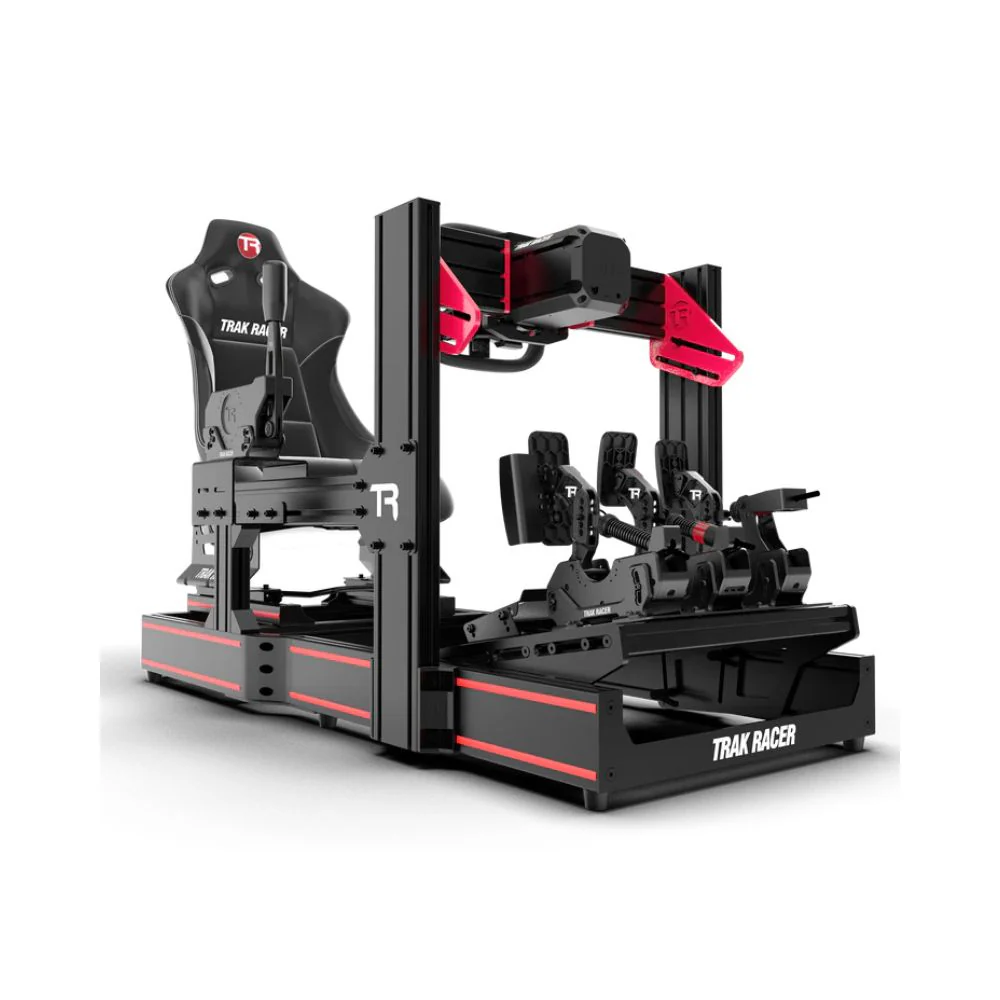
For most home users, the right racing simulator cockpit should give you a stable wheel mount, a firm pedal plate, enough adjustment for your height, and room to upgrade later. Foldable frames and compact stands can work for casual use, but they usually have limits once you move into heavier hardware.
The steering wheel and wheelbase create the main connection between you and the car. This is where you feel kerbs, tyre grip, slides, bumps, and steering weight.
Direct drive wheelbases have become the preferred choice for many sim racers because the motor drives the steering shaft directly. That usually gives sharper force feedback, smoother detail, and stronger response than older gear-driven systems. Still, more torque isn’t always better for every driver. The right wheelbase depends on your cockpit, platform, racing style, and comfort level.
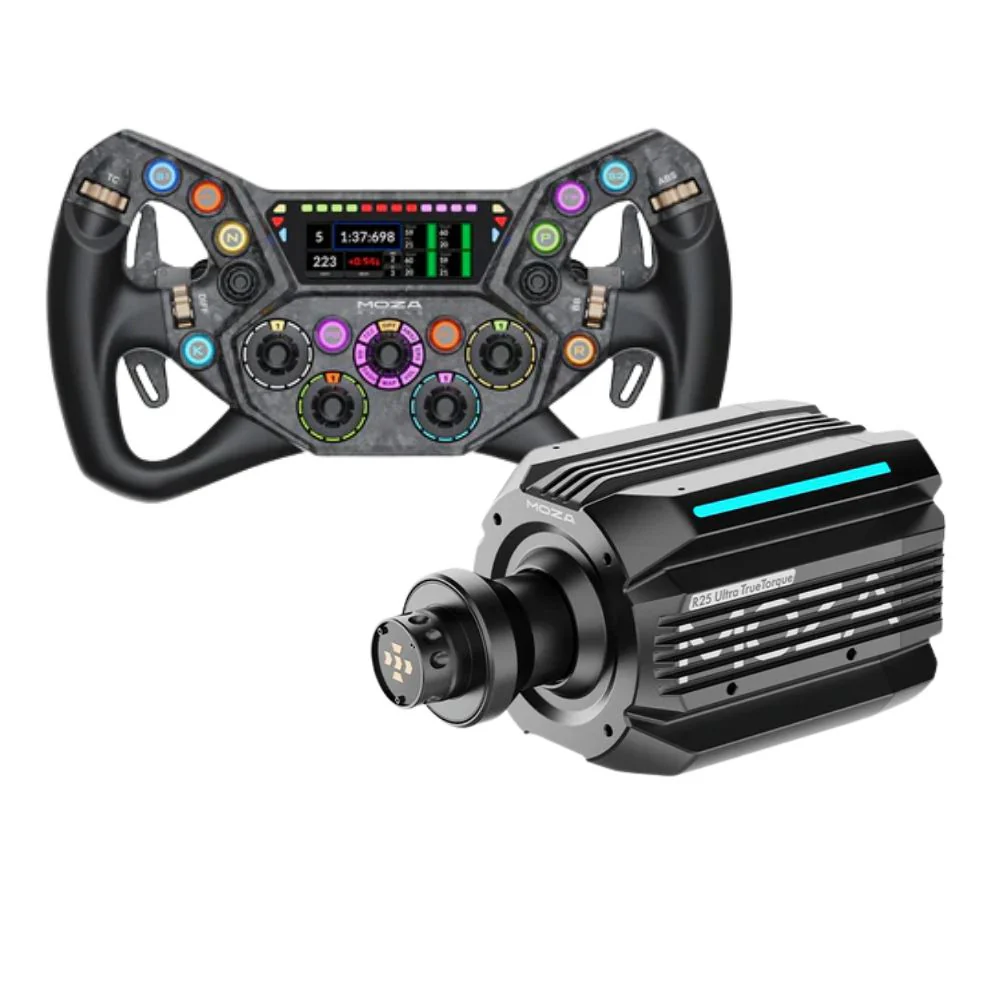
When we compare wheelbases in a racing simulator setup, we don’t only look at torque figures. We look at how controlled the feedback feels, how easy the software is to adjust, how the base mounts to common cockpits, and how well it suits the driver’s platform. Console support is especially important because not every wheelbase works with PlayStation or Xbox.
The steering wheel rim also changes the feel of the setup. A round wheel works well for rally, drifting, and road cars. A GT-style wheel suits endurance racing and sports cars. An F1-style wheel gives a compact layout for formula racing and quick button access.
Drivers building around a direct drive racing wheel should also budget for a strong cockpit. A weak frame can make a powerful wheelbase feel less precise than it should.
Pedals can change your driving consistency more than many beginners expect. In our experience, brake feel is one of the biggest differences between a basic racing simulator and a more controlled setup.
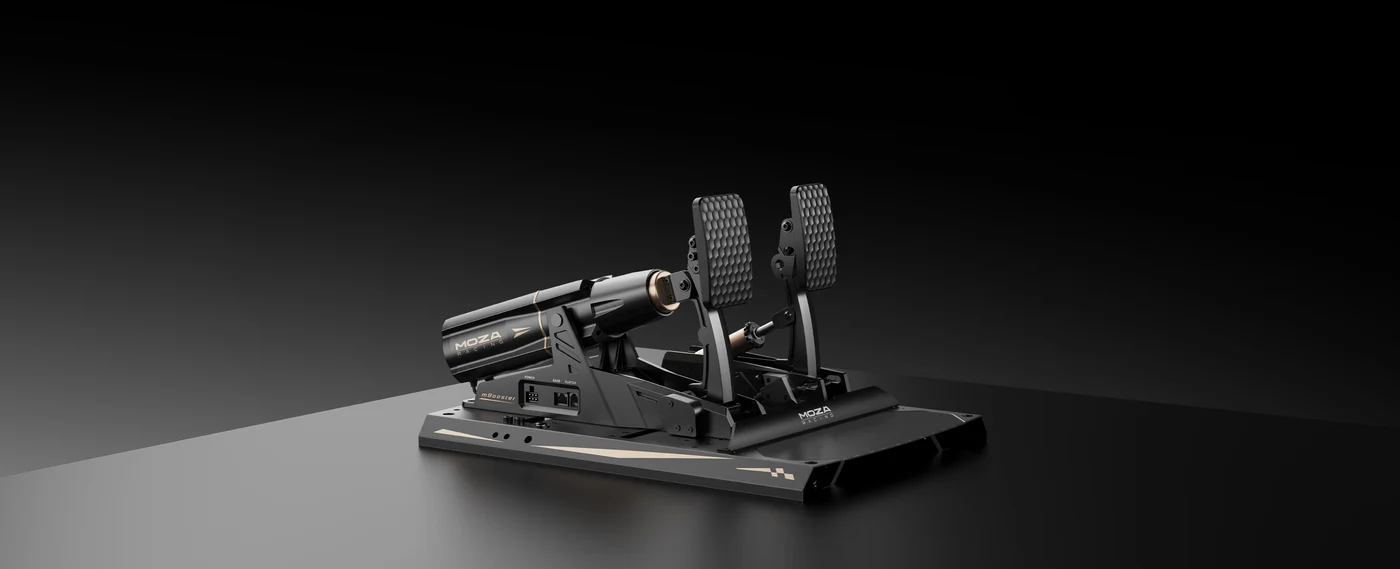
Entry-level pedals usually measure pedal travel. Load cell pedals measure pressure, which gives a more repeatable braking feel. Instead of trying to remember how far your foot moved, you learn how much pressure to apply. This can make braking points more consistent, especially in GT and formula-style racing.
The trade-off is that firmer pedals need a stronger mounting point. If the pedal plate flexes or slides, you lose part of the benefit. That’s why we usually recommend checking cockpit strength before upgrading pedals.
Shifters and handbrakes depend on the type of racing you enjoy. A sequential shifter is useful for rally and race cars. An H-pattern shifter adds more involvement for older road cars and classic racing. A handbrake is almost essential for drifting and rally stages, but it’s not a priority for every racing simulator build.

If you’re upgrading your sim racing pedals, focus on brake feel, pedal angle, and mounting strength before chasing extra features.
Visual setup has a major impact on immersion and control. A racing simulator can feel completely different depending on screen size, distance, height, and field of view.
Single monitors are simple and easy to manage. Ultrawide monitors give more peripheral vision without needing multiple screens. Triple monitors provide a wider view again, which can make it easier to judge corners, mirrors, and nearby cars. VR can create excellent immersion, but it also adds comfort, setup, and hardware demands.
In our experience, monitor placement is one of the most common areas drivers overlook. If the screen is too far away, the cockpit can feel disconnected from the car. If it’s too high or too low, your driving position can feel awkward. A good sim racing monitor setup should place the screen close enough to feel natural while still leaving enough room for the wheelbase and cables.
For most home racing simulator builds, a stable monitor stand is worth considering early. It gives you more control over screen distance and makes future upgrades easier.
Audio adds a lot to the racing simulator experience. Engine sound, tyre noise, gear shifts, road texture, and spotter calls all give feedback that can improve timing and awareness.
A good headset is often the easiest option. It keeps the sound focused, works well for online racing, and doesn’t need extra room. Speakers can create a more open feel, especially in a dedicated sim room. Some drivers also add tactile transducers under the seat or pedals so they can feel engine vibration, kerbs, and surface changes.
Haptic feedback can be a great addition, but it should come after the core setup is right. If the cockpit, pedals, wheelbase, and screen position still need work, haptics won’t fix the main issues. Once the base racing simulator feels stable and comfortable, tactile feedback can make the drive feel more connected.
A racing simulator doesn’t need every upgrade at once. The smartest path depends on what you already own, but the order usually looks like this:
Cockpit or wheel stand stability
Pedal feel and brake consistency
Wheelbase strength and feedback quality
Monitor position or VR setup
Shifter, handbrake, button box, haptics, and motion
The reason is simple. Stability affects everything. A better cockpit makes your pedals feel more consistent and your wheelbase feel more accurate. Better pedals often improve lap consistency faster than cosmetic upgrades. A better wheelbase adds detail and strength, but it needs a solid frame to work properly.
If you’re building a racing simulator setup from scratch, don’t spend the whole budget on the wheelbase and leave the cockpit as an afterthought. The frame, pedals, and seating position are just as important to the final driving feel.
Compatibility is one of the most important parts of choosing a racing simulator. PC usually gives the widest range of hardware options, but console setups need more care. Some wheelbases work only with PC. Some need a specific wheel rim or hub for Xbox. Some products support PlayStation only through selected bases.
Before buying, check the full chain of compatibility. The wheelbase, steering wheel, pedals, shifter, handbrake, and platform all need to work together. It’s also worth checking mounting patterns, because not every cockpit includes pre-drilled support for every product.
For an Xbox racing simulator, confirm Xbox support at the wheelbase and wheel rim level. For a PS5 racing simulator, confirm PlayStation support before choosing accessories. PC users have more flexibility, but still need to check software, drivers, firmware, and USB requirements.
A racing simulator should be planned as a full system, not a cart full of separate parts.
The most common mistake is buying parts in the wrong order. Many drivers start with the most powerful wheelbase they can afford, then mount it to a frame that can’t handle the force. Others buy load cell pedals and only later realise their cockpit moves under braking.
Another common issue is driving position. If the pedals are too close, your legs feel cramped. If the wheel is too high, your shoulders can fatigue. If the seat is too upright or too reclined for your racing style, longer sessions become uncomfortable.
Cable routing also gets overlooked. A racing simulator can have wheelbase power cables, USB cables, pedal cables, shifter cables, handbrake cables, monitor cables, headset cables, and sometimes haptic or motion wiring. It’s better to set the final seating position first, then route cables after everything is locked in.
Space planning is just as important. Measure the full footprint of the cockpit, not just the frame length. Leave room for the seat to slide, your body to get in and out, and the monitor stand to sit in the right position.
Start with the cockpit frame and seat. Set your seat position before locking down the rest of the hardware. Your legs should have a slight bend when pressing the brake, and your back should stay supported without needing to reach for the wheel.
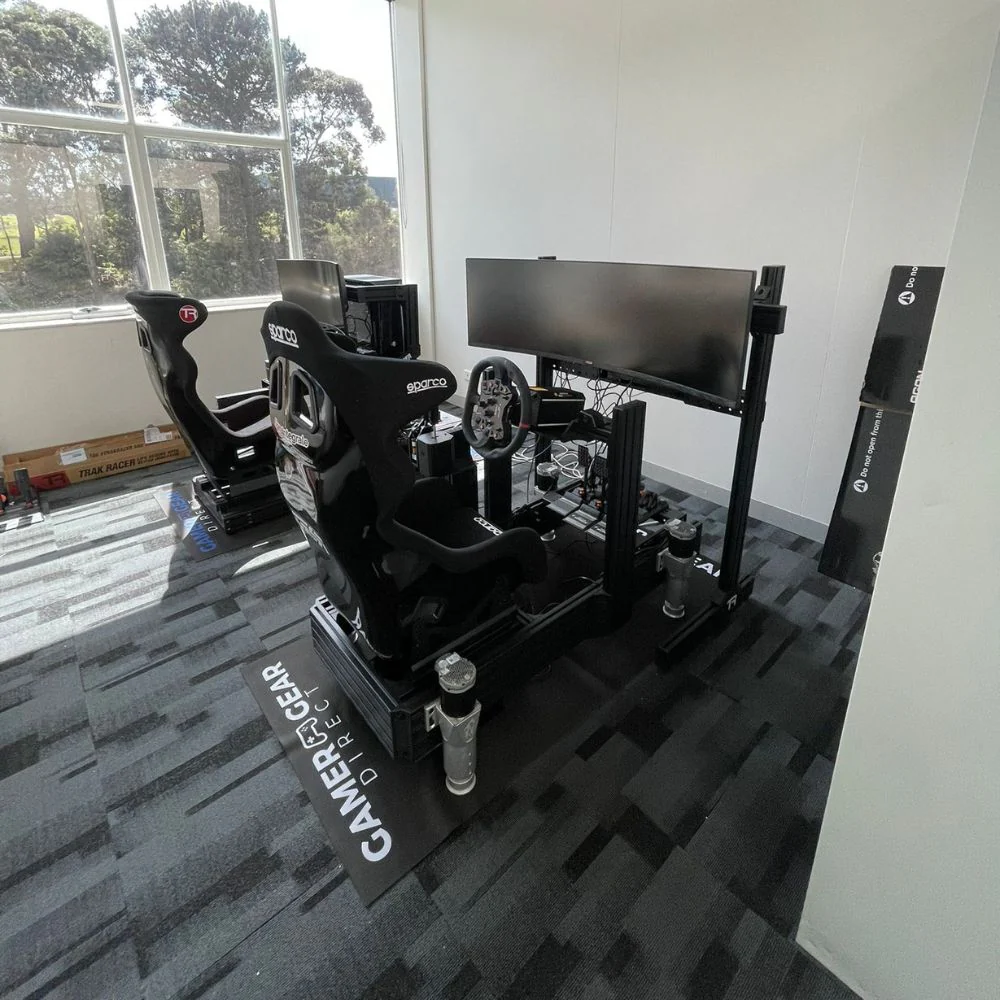
Next, mount the pedals. The pedal angle should feel natural under braking. If the brake pedal is too flat or too steep, it can make pressure control harder. Once the pedals feel right, mount the wheelbase and adjust the wheel height and reach. Your elbows should stay slightly bent, and your shoulders should remain relaxed.
After that, add the monitor or VR setup. For screen-based racing, bring the display close enough to create a natural cockpit view. Then route the cables, secure loose wiring, update firmware, and calibrate the wheel and pedals in software.
Take time with the first setup. A racing simulator that’s adjusted properly will feel better, reduce fatigue, and make it easier to build consistent driving habits.
Hardware is only half of the racing simulator experience. Software settings can completely change how the setup feels.
After assembly, calibrate steering rotation, pedal inputs, brake sensitivity, force feedback strength, and field of view. Many new drivers leave default settings in place, then assume the hardware is the problem. In reality, the wheelbase may be too strong, the brake sensitivity may be too sharp, or the field of view may be wrong for the screen distance.
Different games also behave differently. Assetto Corsa, iRacing, Automobilista, Gran Turismo, Forza Motorsport, and rally titles all have their own settings and feel. The best sim racing games for your setup depend on your platform, car preference, and how realistic you want the driving model to feel.
A racing simulator should feel controlled, not tiring. If your arms are fighting the wheel or your brake pedal feels impossible to judge, adjust the settings before buying more hardware.
Motion can add another layer of immersion, but it isn’t the first upgrade most drivers need. A motion racing simulator works best when the core setup is already stable, comfortable, and well calibrated.
Motion systems can simulate pitch, roll, braking movement, acceleration cues, kerbs, bumps, and surface changes. They work best with a rigid cockpit and secure mounting points. If the frame flexes before motion is even added, the result won’t feel as clean.
Drivers considering motion sim racing should think about space, noise, wiring, power access, game support, and the type of movement they want. Some systems focus on seat movement. Others move the full frame. More advanced systems add extra axes of movement, but they also need more room and a larger budget.
For many home users, motion is an upgrade after the cockpit, pedals, wheelbase, and display are already sorted.
A beginner racing simulator should be simple, stable, and easy to use. A compact cockpit or wheel stand with an entry-level wheel and pedals can be enough for casual racing, especially in shared living spaces.
A mid-range racing simulator suits drivers who want better feedback and consistency. This is where a stronger cockpit, direct drive wheelbase, and load cell pedals make sense. It’s the best fit for regular sim racers who want a setup that feels more controlled without going into a full pro-style build.
A high-end racing simulator suits drivers who want a dedicated space, stronger hardware, multiple screens or VR, firmer pedals, shifters, handbrakes, haptics, and possibly motion. At this level, planning becomes more important because every part needs to work together.
F1-style drivers may prefer a lower seating position, formula wheel, and open-wheel game support. GT drivers usually benefit from a stable cockpit, round or GT-style wheel, load cell pedals, and a strong monitor setup. Rally and drift drivers should budget for a round wheel, shifter, and handbrake.
When we assess racing simulator products, we look beyond the product listing. Our team considers how the gear fits into a complete setup, how easy it is to assemble, how it handles repeated adjustment, and how well it suits real customer use.
We look at frame strength, mounting options, pedal feel, wheelbase behaviour, compatibility, cable management, adjustment range, upgrade options, and long-session comfort. We also consider the questions customers ask before buying, including available space, platform support, racing style, and budget.
If a product suits one type of driver more than another, that should be clear. A compact racing simulator can be the right choice for a lounge room. A full aluminium profile cockpit can be the better choice for a dedicated room. A high-torque wheelbase can be excellent on the right frame, but too much for a light stand.
The best racing simulator is the one that fits your space, platform, budget, and driving style while giving you a stable base to improve over time.
A racing simulator setup should be chosen as a complete system. The cockpit supports the wheelbase and pedals. The pedals affect braking consistency. The screen position affects visibility and immersion. The software settings affect how the hardware feels.
Start with stability, comfort, and compatibility. Then upgrade based on the type of racing you enjoy most. A well-planned racing simulator doesn’t need every premium accessory on day one. It needs the right foundation, the right fit, and the right upgrade path.


