





Sim Racing Monitor Guide: Choose Your Perfect Display
|
|
Choosing the right sim racing monitor can completely change how your racing simulator feels.
After testing different screen layouts across our Dandenong South showroom rigs, the team here at Gamer Gear Direct has found one thing over and over again: the best display setup isn’t always the biggest, most expensive, or highest-spec option. It’s the one that suits your seating position, available space, PC performance, and racing style.
For more setup advice, explore our racing simulator packages, sim racing cockpits, and sim racing accessories.
You've probably heard people say that a wheel and pedals are the most important sim racing upgrades. While that's partially true, your display is the window into your virtual world.
A poor quality or improperly configured sim racing monitor can introduce input lag, motion blur, and distorted visuals that directly impact your ability to hit apexes and judge distances.
Think about it this way: even the most expensive direct drive wheel won't help you if you can't see the track clearly or if your screen introduces a delay between your inputs and what you see.
Professional sim racers spend considerable time optimising their visual setup because they know that response time, refresh rate, and field of view directly correlate with lap times.
We’ve tested different sim racing monitor layouts in real racing simulator setups. A monitor behaves differently once it’s mounted to a cockpit, placed close to your wheelbase, angled around your seat, and used during long driving sessions.
During showroom testing, we looked at:
Screen size and viewing distance
Single-screen, ultrawide, and triple-screen layouts
Curved and flat monitor setups
Refresh rate and motion clarity
FOV setup and cockpit visibility
Mounting stability
Space requirements
GPU demand
Ease of use for new and experienced drivers
We also paid close attention to what customers notice when they sit in a rig for the first time. In our experience, most people instantly notice screen size and immersion, but the real improvement comes from correct screen placement, strong frame rate, stable mounting, and accurate FOV.
When evaluating any display for racing, you're balancing three key factors:
Visual quality: Resolution, colour accuracy, and contrast that help you read the track
Speed: Refresh rate and response time that keep motion smooth and lag-free
Immersion: Size, curvature, and field of view that pull you into the cockpit
Getting all three right creates that magical experience where you forget you're sitting in your home and genuinely feel like you're at Monza or Bathurst.
Based on the setups we’ve tested, each display layout has a clear role.
A single sim racing monitor is usually the easiest and cleanest setup. It’s great for new racers, compact rooms, and anyone who wants strong performance without making the rig too complex.
A 49-inch ultrawide gives you more horizontal vision and a more immersive cockpit feel without the alignment work of triple screens. It’s a strong option for home racers who want a cleaner setup with fewer cables and no bezel gaps.
Triple monitors still deliver the best side visibility. You can see further into corners, pick up cars beside you, and get a stronger sense of speed through your peripheral vision. The trade-off is that triples need more room, stronger mounting, more setup time, and more GPU power.
That’s the practical choice most buyers face: simple and clean, wide and immersive, or maximum race awareness.
The panel type determines how your sim racing monitor produces images, and each technology brings different strengths to the track. You'll encounter three main panel types when shopping for displays.
TN (Twisted Nematic) panels are the speed demons of the display world. They offer the fastest response times, often as low as 1ms, which means minimal ghosting during fast motion. The trade-off? Viewing angles are terrible, and colours look washed out compared to other technologies. For competitive racing where every millisecond counts, TN panels still have their place, though they're becoming less popular as IPS technology improves.
IPS (In-Plane Switching) panels deliver gorgeous colours and excellent viewing angles. Modern IPS displays have caught up significantly in response times, with many gaming-focused models hitting 1ms or close to it. You'll pay a premium, but the visual quality makes cockpit details, track surfaces, and weather effects look stunning. If you care about the complete visual package, IPS is your best bet.
VA (Vertical Alignment) panels sit somewhere in the middle. They offer the best contrast ratios, making blacks look truly black, which is fantastic for night racing or darker cockpits. Response times are slower than TN or IPS, which can cause some ghosting, but for casual racers who prioritise image quality over competitive edge, VA panels offer excellent value.
Refresh rate tells you how many times per second your monitor updates the image. A 60Hz screen refreshes 60 times per second. A 144Hz screen refreshes 144 times per second.
In real driving, the jump from 60Hz to 144Hz is one of the most obvious upgrades we notice. Fast steering corrections feel smoother. Corner exits look cleaner. It’s easier to track the car when it starts to slide. The whole sim racing monitor setup feels more responsive.
For most customers, we’d generally recommend 144Hz to 165Hz as the sweet spot. It’s a major improvement over 60Hz, but it doesn’t demand the same PC power as very high-refresh 240Hz displays.
Response time is different. It measures how quickly pixels change from one shade to another. Lower response times can reduce blur and ghosting, but don’t rely only on the number printed on the box. Input lag, panel quality, overdrive settings, and real-world motion handling all matter too.
A strong sim racing monitor should give you smooth motion without creating visual artefacts that distract you mid-corner.
Resolution controls image sharpness and the most common options are 1080p, 1440p, and 4K.
1080p can still work for budget setups, smaller screens, and systems that need high frame rates without heavy GPU demand. It’s not the sharpest option, but it can feel smooth if the monitor and PC are well matched.
1440p is the sweet spot for many sim racing monitor setups. It gives you a sharper image than 1080p while still being realistic to run at high refresh rates with a capable gaming PC. On 27-inch to 32-inch screens, 1440p often feels crisp without overloading the system.
4K looks excellent, especially on larger single screens, but it needs more GPU power if you want high frame rates. For serious racing, consistent frame rate is more important than chasing maximum resolution.
Our recommendation is simple: don’t buy more resolution than your PC can drive smoothly. A stable 1440p high-refresh setup will often feel better than a 4K setup that struggles to hold frame rate.
This decision shapes your entire rig design. A single sim racing monitor setup is simpler, cheaper, and requires less GPU power. One quality ultrawide display can provide excellent immersion, especially curved models that wrap around your peripheral vision.
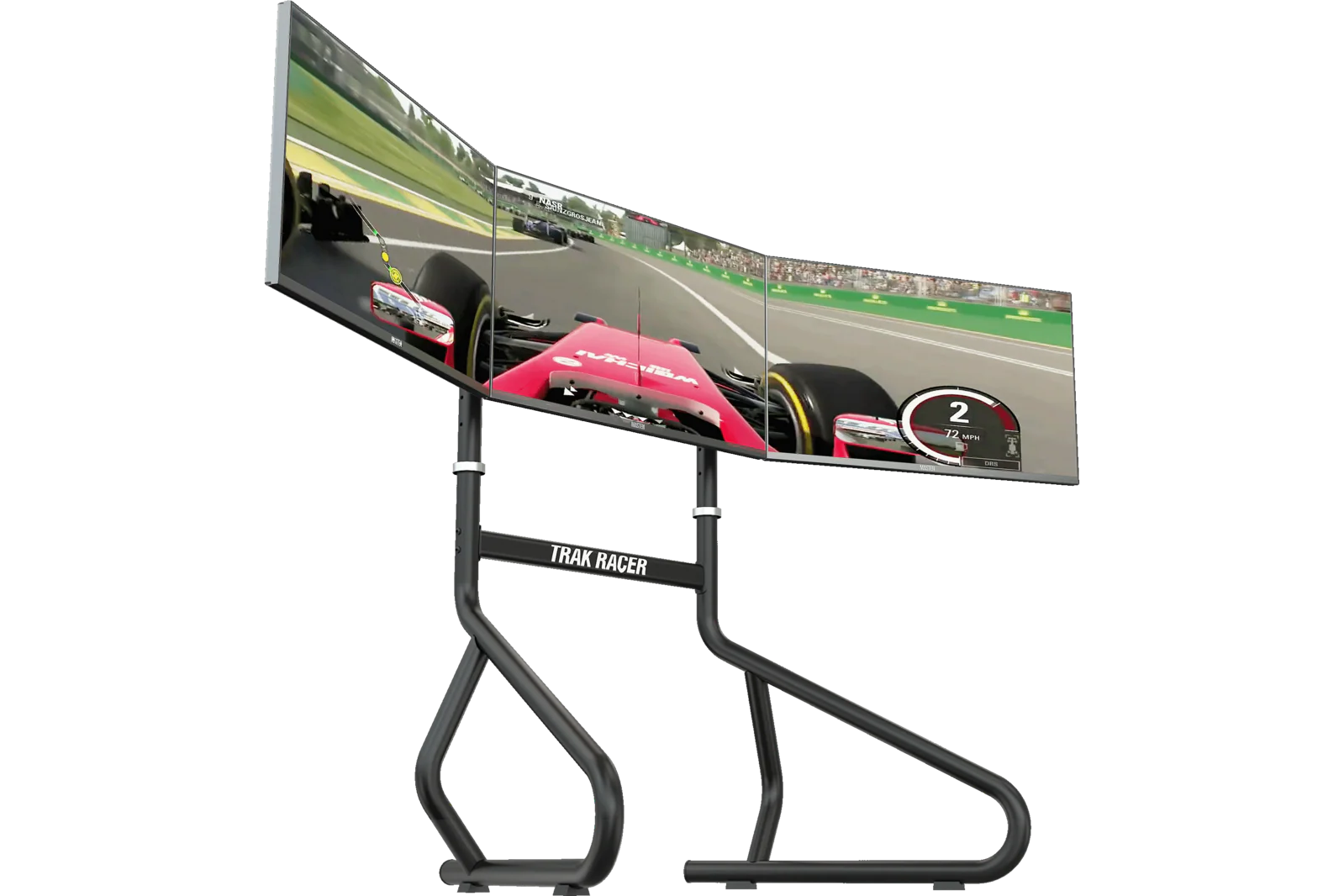
Triple monitor setups create unmatched peripheral awareness. You'll see into corners earlier, spot competitors alongside you, and judge distances more accurately.
This sim racing setup guide covers why screen placement matters so much for immersion, and triples take this to another level.
But triples come with challenges:
Bezels: The frames between screens break immersion unless you configure bezel correction properly
GPU demand: Rendering three screens requires serious graphics horsepower
Space: You need physical room for mounting hardware and screen width
Configuration: Setting angles and FOV correctly takes time and patience
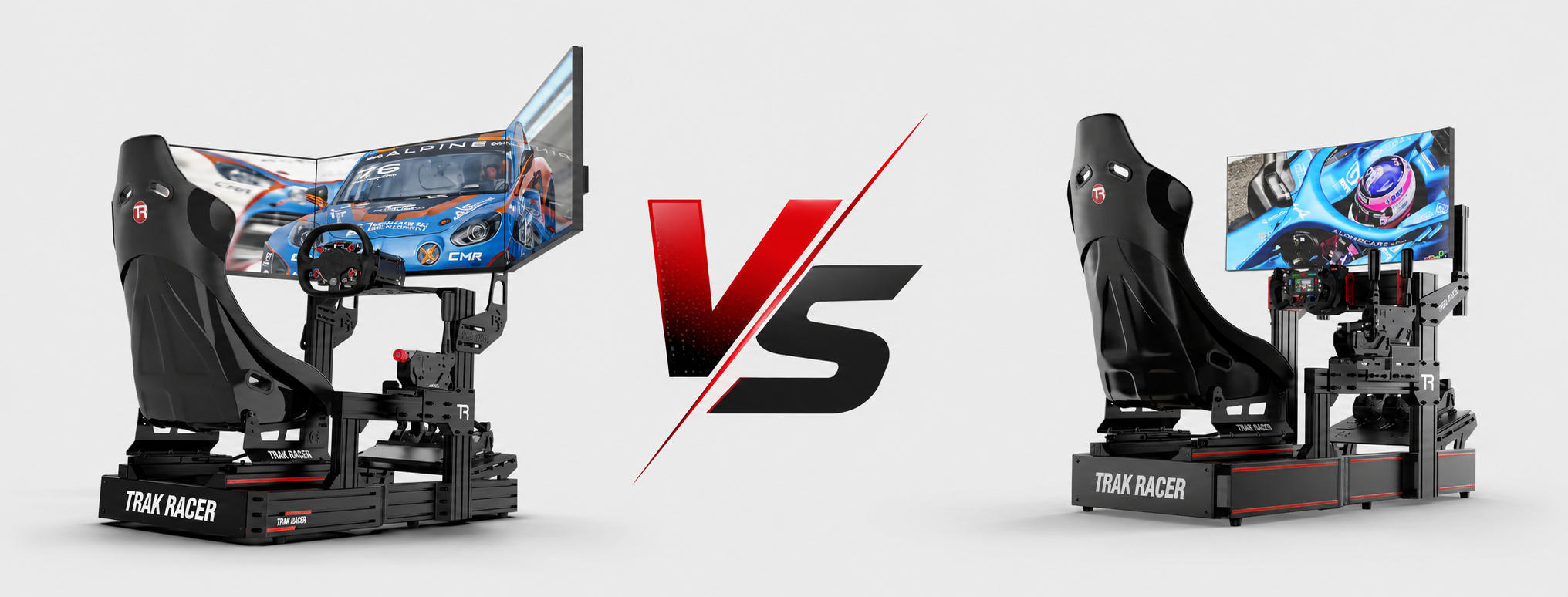
The 49-inch ultrawide "super ultrawide" category offers a middle ground. These massive displays provide extensive horizontal field of view without bezels or multiple GPU outputs. The curved designs wrap around you similarly to triples, and configuration is straightforward. However, you're still missing the extreme peripheral vision that properly angled triple screens provide.
Curved displays aim to match your natural field of vision, keeping all parts of the screen equidistant from your eyes. For sim racing monitors, curvature is measured in radius (like 1800R or 1000R), where lower numbers mean more aggressive curves.
A curved sim racing monitor provides two main benefits for racing. First, it reduces distortion at the screen edges, making straight track elements actually appear straight in your peripheral vision. Second, it creates a subtle immersion boost by wrapping the image around you.
Flat screens work perfectly fine, especially in triple setups where the angled positioning creates a natural curve around you. The key is matching your viewing distance to your screen size and curvature.
Bigger isn't always better. The relationship between screen size and viewing distance determines your effective field of view and immersion level. Sit too close to a massive screen and you'll need to move your eyes rather than perceive the image naturally. Sit too far from a small display and you lose detail and immersion.
For single screens, most racers prefer 27-32 inches at typical desk distances (60-80cm). This range fills your central vision without overwhelming peripheral awareness. Triple setups typically use 24-27 inch screens, as anything larger becomes awkward to angle properly.
Here's something many new sim racers miss: your sim racing monitor's physical setup is only half the battle. Software field of view settings determine how the 3D world projects onto your screen, and getting this wrong ruins everything.
FOV is measured in degrees and represents how much of the virtual world you see. Too wide (high FOV number) and everything looks distorted like a fisheye lens. Too narrow (low FOV) and you lose spatial awareness. The correct FOV matches your physical setup, creating a 1:1 scale where virtual distances match real-world perception.
Most racing sims include FOV calculators that require three measurements:
Screen size (diagonal measurement)
Viewing distance (your eyes to screen)
Screen angle (for triples)
Input these values, and the game calculates the mathematically correct FOV. Some racers prefer slightly adjusted values for gameplay reasons, but starting with proper FOV transforms your driving accuracy.
Learning how to set FOV correctly makes your sim racing monitor setup feel realistic rather than "gamey."
Setup Type |
Typical FOV Range |
Viewing Distance |
|---|---|---|
Single 27" |
40-50° |
60-70cm |
Single 32" |
50-60° |
60-70cm |
Triple 27" |
120-160° |
60-80cm |
49" Ultrawide |
70-90° |
70-90cm |
You've chosen your sim racing monitor, now what? Proper physical setup and software configuration squeeze out every bit of immersion potential. These practical tips come from years of rig building and racing.
Mount your screens securely. Wobbly monitors break immersion instantly. Use proper monitor arms or rig-specific mounting brackets that eliminate flex and vibration. Your screens should feel like part of the car, not separate objects.
Angle triple screens correctly. This isn't guesswork. Most sims work best with 45-60 degree angles, creating a subtle wrap without extreme distortion.
Calibrate brightness and contrast. Sim racing often happens in varying virtual lighting conditions. You need to see details in shadows while not getting blinded by bright sky. Start with manufacturer recommendations, then adjust based on your room lighting.
Minor adjustments make major differences:
Height positioning: Top of screen should be roughly at eye level
Cable management: Loose cables ruin the illusion and create clutter
Room lighting: Avoid glare by positioning lights behind or beside your screens
Graphics settings: Balance visual quality with frame rate for smooth motion
Your racing simulator setup includes more than just the display, but the screen is what you'll stare at for hours during practice sessions and races.
Premium sim racing monitor models include features beyond basic specs. Some genuinely improve your racing experience, while others are marketing fluff. Let's separate useful from unnecessary.
Adaptive sync technology (FreeSync or G-Sync) eliminates screen tearing by synchronising your monitor's refresh rate with your GPU's output. When frame rates fluctuate, adaptive sync keeps everything smooth. For sim racing where consistent performance matters, this technology is genuinely valuable.
HDR (High Dynamic Range) expands contrast and colour range, making bright highlights and dark shadows more realistic. In racing sims with dynamic weather and time of day, HDR creates stunning sunsets and realistic headlight beams. However, HDR requires significant GPU power and only a few racing sims implement it well.
Black frame insertion and motion blur reduction technologies insert black frames between regular frames to reduce perceived blur. These can sharpen motion but reduce brightness and might introduce flicker. Worth testing if available, but not essential.
Built-in crosshairs and overlays are useless for sim racing. Save your money.
Quality sim racing monitors span enormous price ranges. A basic 1080p 60Hz display might cost $200, while a premium 4K 144Hz HDR monster could hit $1,500 or more. Multiply by three for triple setups and costs escalate quickly.
Where should you invest your budget? Start with the basics and upgrade strategically. A single quality 1440p 144Hz sim racing monitor at $400-600 provides a better overall experience than three cheap 1080p 60Hz screens. You can always add matching displays later for triples.
Consider the entire ecosystem cost. That 4K 240Hz display sounds amazing until you realise you need a $2,000 GPU to drive it properly. Match your display choice to your PC capabilities and racing goals.
Budget tier ($200-400): 1080p 144Hz IPS panels provide solid performance for casual racing. You won't get cutting-edge features, but modern budget displays are surprisingly good.
Enthusiast tier ($400-800): 1440p 144Hz with IPS panels and adaptive sync. This range offers the best performance-per-dollar for serious sim racers.
Premium tier ($800+): 4K, high refresh, HDR, and premium panel quality. Diminishing returns kick in here unless you're chasing every advantage.
Learning from others' mistakes saves money and frustration. These common errors plague new sim racing monitor buyers.
Buying mismatched screens for triples: If you're going triple, buy identical displays. Different refresh rates, colours, or sizes create jarring visual breaks that ruin immersion. Even slight manufacturing variations between batches can cause colour mismatches.
Ignoring input lag specifications: Response time and input lag are different measurements. A display might have 1ms response time but significant input lag from processing. Check professional reviews for measured input lag, not just manufacturer specs.
Undersizing for viewing distance: That 24-inch screen looked fine in the shop, but at your planned seating distance, it disappears. Bigger isn't always better, but too small definitely hurts immersion.
Skipping proper FOV configuration: You can have the world's best sim racing monitor, but wrong FOV settings make everything feel artificial. Spend twenty minutes calculating and testing proper FOV before your first race.
After testing different display layouts in our Dandenong South showroom, our advice is simple: choose the sim racing monitor setup that suits your real space, not just the highest spec on paper.
For most home racers, a high-refresh 1440p screen or a 49-inch ultrawide gives the best balance of performance, immersion, and practicality. For serious racers with the space and PC power, triple monitors still deliver the strongest awareness and cockpit feel.
The right sim racing monitor should make the car easier to place, the track easier to read, and the whole rig more enjoyable to drive. Get the screen size, refresh rate, mounting, viewing distance, and FOV right, and your racing simulator will feel sharper every time you jump in.
If you’re planning a new rig or upgrading your current display, the team at Gamer Gear Direct can help you choose a sim racing monitor setup that suits your cockpit, PC, budget, and racing goals.


