🥳Sim Sale On Now - Up To 30% Off🥳
Skip to content
Formula 1 Driving Simulators Guide: What We’ve Learned After Testing

Formula 1 Driving Simulators Guide: What We’ve Learned After Testing

Written by: Karl Luis Matias

|

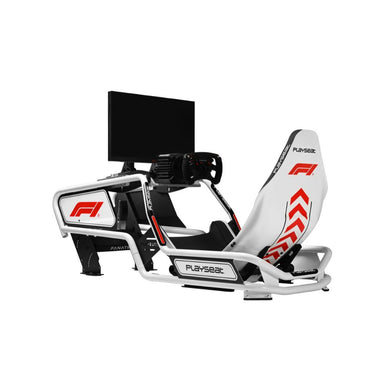
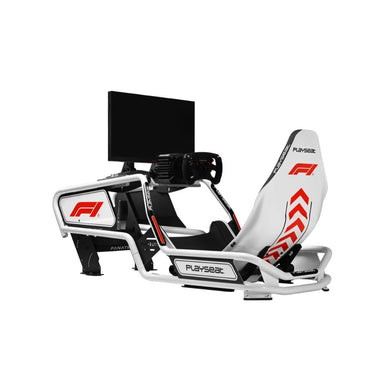
A Formula 1 driving simulator can feel sharp, fast and immersive, but only when the core setup works as one system. The cockpit has to stay rigid, the wheelbase needs clean feedback, the pedals need consistent pressure, and the screen position has to support accurate braking and corner entry.

At Gamer Gear Direct, we’ve tested a range of racing simulator cockpits, direct drive wheelbases, pedal sets, seats, monitor layouts and accessories at our Dandenong showroom. The biggest lesson from that testing is simple: the best Formula 1 driving simulator isn’t always the most expensive build. It’s the setup that gives you stable inputs, a comfortable F1-style driving position and enough adjustment to suit your body, room and racing goals.

This guide breaks down what we’ve learned from hands-on testing, what to prioritise first and how to avoid the common setup issues that can make a Formula 1 driving simulator feel harder to drive than it should.

Tested and Reviewed by Gamer Gear Direct

This guide is based on product testing and simulator setup experience from the Gamer Gear Direct team. We’ve assembled, adjusted and driven multiple racing simulator setups at our Dandenong showroom, with a focus on cockpit rigidity, pedal feel, wheelbase feedback, monitor placement, seating comfort and long-session usability.

Our testing looks beyond spec sheets. We check how much movement a cockpit has under braking, how the wheel deck handles direct drive force feedback, how easy it is to reach wheel controls, how the seat position feels after longer sessions and how much adjustment a driver needs before the rig feels natural.

If you’re comparing a Formula 1 driving simulator for home use, those details have a direct impact on consistency. A powerful wheelbase feels impressive, but it won’t deliver its best feel if the cockpit moves under load. A premium pedal set can improve braking, but only when the pedal angle and seat distance are set correctly.

How We Test Formula 1 Driving Simulator Setups

When we test a Formula 1 driving simulator, we start with the cockpit. F1-style driving places more load through the wheel and brake pedal than many new racers expect, so frame stability is one of the first things we check. We look for movement at the wheel deck, pedal plate and seat mount, then adjust the driving position to see how easy it is to create a repeatable setup.

Next, we test the controls. A direct drive wheelbase should feel responsive without shaking the frame. A brake pedal should allow firm, repeatable pressure without forcing the driver into an awkward leg angle. A formula-style wheel should give easy access to the most-used controls, including DRS, ERS, brake bias, pit limiter and camera settings.

We also test display placement. A Formula 1 driving simulator needs a clear view of braking markers, apexes and corner exits. If the screen is too far away, too high or off-centre, the whole rig can feel less natural. That’s why monitor stands, integrated mounts and seating position are part of the full setup, not afterthoughts.

For customers building at home, we usually recommend starting with racing simulator cockpits, direct drive racing wheels, sim racing pedals and racing simulator monitor stands before adding extras such as motion or tactile feedback.

What Makes a Formula 1 Driving Simulator Feel Right?

A Formula 1 driving simulator feels right when the driver can focus on the car instead of fighting the setup. You should be able to brake firmly without the pedals sliding, steer without the wheel deck flexing, and hold the wheel without shoulder strain.

The main parts that shape the experience are cockpit rigidity, seating position, wheelbase response, brake pedal feel and screen placement. None of these parts work alone. During our showroom testing, we’ve found that a mid-range setup with good balance can feel better than a high-cost build with poor ergonomics.

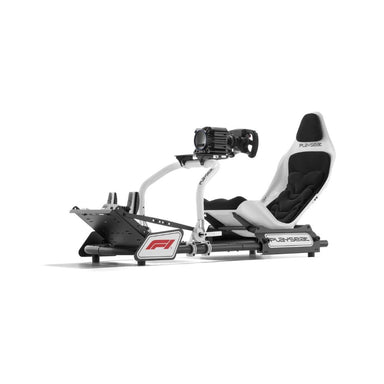
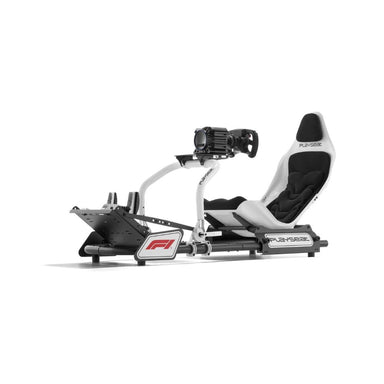
For F1-style racing, the cockpit should support a low, reclined or semi-reclined position if that’s the style of rig you choose. Some drivers prefer a more GT-style seating position for comfort and easier entry. Both can work, but the key is adjustment. A Formula 1 driving simulator should let you position the wheel, pedals and seat so your arms, hips and legs aren’t under strain.

Home F1 Sim vs Professional Simulator Setups

Most home users don’t need a commercial training system to enjoy a Formula 1 driving simulator. A home setup can deliver excellent control and immersion when the main components are chosen carefully.

A beginner home setup usually focuses on value and space saving. It may use a compact cockpit or wheel stand, an entry-level wheelbase and basic pedals. That can be enough for casual F1 racing, but the limitations show up when braking harder, driving longer sessions or upgrading to stronger force feedback.

A mid-range Formula 1 driving simulator is often the best fit for regular home racers. This usually means a rigid cockpit, direct drive wheelbase, load cell brake pedal and single ultrawide or triple-screen monitor setup. From our testing, this type of build gives most drivers the biggest jump in control without moving into commercial-grade pricing.

A high-end Formula 1 driving simulator suits drivers who want stronger feedback, more adjustability, motion, tactile feedback, advanced pedals or a dedicated racing room. For multi-user spaces such as esports venues, training facilities and showrooms, durability and fast adjustment become more important because different drivers need to fit the same rig.

Choosing the Right Cockpit

The cockpit is the foundation of a Formula 1 driving simulator. If the cockpit flexes, everything else feels less precise. Wheelbase feedback becomes harder to read, braking pressure becomes less consistent and the rig can feel distracting during aggressive inputs.

From our testing, we’d prioritise a rigid frame before moving into high-end accessories. A direct drive wheelbase can expose weakness in a lighter cockpit, especially when force feedback is turned up. A load cell brake can also place more stress on the pedal plate than spring-based pedals, so the pedal mount needs to stay firm.

For smaller rooms, a compact cockpit can still work well if it has secure mounting points and enough adjustment. For dedicated racing rooms, aluminium profile rigs give more flexibility for wheelbase mounts, pedal trays, seat rails, shifters, handbrakes, monitor arms and future accessories.

If you’re planning to build a Formula 1 driving simulator around long sessions, check seat comfort before focusing only on frame size. A stiff seat with poor fit can become uncomfortable quickly, especially in a reclined position. Look for a seat that supports your back, keeps your hips stable and gives enough room across the shoulders and waist.

Wheelbase, Pedals and Steering Feel

The wheelbase and pedals are where the Formula 1 driving simulator starts to feel alive. A direct drive wheelbase gives stronger detail than gear or belt-driven systems because the steering motor connects more directly to the wheel shaft. That can make kerbs, grip loss and steering load easier to feel.

Force feedback strength isn’t the only goal. In our testing, clean detail and control are more useful than raw power. If the force feedback is too high, drivers can start fighting the wheel instead of placing the car accurately. For F1-style driving, smooth steering inputs are just as important as speed.

Pedals often make a bigger difference than new drivers expect. A load cell brake measures pressure rather than simple pedal travel, which can make braking more repeatable. That’s important in a Formula 1 driving simulator because corner entry is where a lot of lap time is won or lost.

If your budget is limited, don’t spend everything on the wheelbase and leave the pedals as an afterthought. A balanced setup with a stable cockpit, direct drive wheelbase and load cell brake will usually feel more controlled than a powerful wheelbase bolted to a weak frame with basic pedals.

For drivers upgrading their controls, formula steering wheels, load cell sim racing pedals and direct drive wheelbases are usually the first areas to compare.

Screens, VR and PC Performance

A Formula 1 driving simulator needs clear, responsive visuals. You need to see braking boards, apexes, mirrors and cars around you without delay. The right screen setup depends on your room, budget and preference.

A single monitor is simple, clean and easier to run. An ultrawide monitor can give a broader field of view without the complexity of triples. Triple screens can create a deeper cockpit feel and improve side vision, but they take more space and need more careful alignment. VR can be highly immersive, but comfort, headset weight and PC performance need to be considered before committing to long sessions.

During showroom setup checks, screen height and distance are two of the most common issues we adjust. If the display is too high, the driver may look up instead of straight ahead. If it’s too far away, apexes and braking points can feel harder to judge. A Formula 1 driving simulator should place the driver’s eyes, wheel rim and display in a natural line.

PC performance also counts. Smooth frame rate and low input delay make the car easier to control. For F1 racing, stutter or latency can hurt braking precision, especially through fast corners and wheel-to-wheel moments.

Software for F1 and Open-Wheel Sim Racing

The software you choose shapes the driving feel, car list, track selection and online racing options. For Formula 1, EA SPORTS F1 25 with the 2026 Season Pack is the safer reference point. It gives F1 fans access to official teams, cars and season content through the current EA SPORTS F1 platform.

A Formula 1 driving simulator can also run open-wheel racing through other sim platforms, depending on what you want from the experience. Some drivers prefer mod support, broader physics options, online leagues, custom championships or deeper setup work. Before choosing software, check current platform support, wheel compatibility, car content, track content and online activity.

From a hardware point of view, the key is control mapping. F1-style driving uses a lot of inputs. Brake bias, ERS, DRS, pit limiter, differential settings and radio controls should be mapped where you can reach them quickly. A Formula 1 driving simulator feels far easier to manage when the wheel has enough buttons, rotary controls or paddles for the way you race.

Formula 1 Driving Simulator Setup Guide

Start by placing the cockpit in a space with enough room to enter, exit and adjust the rig. Leave enough clearance behind the pedals and around the wheelbase so cables don’t get crushed or pulled during use.

Set the seat first. Your back should feel supported, your shoulders should stay relaxed and your arms should have a slight bend when holding the wheel. Then move the pedals so you can press the brake firmly without locking your knee or pushing your hips out of position.

Mount the wheelbase so the wheel sits at a comfortable height. If the wheel is too high, your shoulders can fatigue. If it’s too low, the driving position can feel cramped. A Formula 1 driving simulator should let you steer with control, not tension.

Once the hardware is mounted, tighten every major bolt and check for movement. Push the brake pedal hard, turn the wheel from side to side and check the seat rails. Then connect the wheelbase, pedals and display before opening your software.

Calibration should be done before your first proper session. Set steering rotation, pedal range, brake force and force feedback strength. With a load cell brake, start with a pressure setting you can repeat consistently. You can raise it later once your muscle memory improves.

Common Mistakes We See in F1 Sim Setups

The most common mistake is spending too much on one component and ignoring the full system. A high-end wheelbase won’t fix a cockpit that moves. Premium pedals won’t feel right if the angle is wrong. A large monitor won’t improve immersion if it’s mounted too far away.

Another common issue is setting force feedback too high. Strong feedback can feel exciting at first, but it may slow your steering correction and make longer sessions tiring. In our testing, drivers often become more consistent after reducing force feedback and focusing on cleaner inputs.

Pedal position is another area that gets overlooked. A Formula 1 driving simulator needs a brake pedal position that lets you apply pressure smoothly. If the pedals are too close, the driver can feel cramped. If they’re too far away, braking becomes inconsistent.

The final mistake is poor cable routing. Loose cables around the pedal area can cause disconnections, movement or safety issues. Take the time to route cables neatly and keep them away from moving parts.

Driving Technique Tips From Our Testing

A Formula 1 driving simulator rewards smooth inputs. New drivers often try to gain time by braking later, turning harder and adding throttle sooner. That can work for a single corner, but it usually creates inconsistency across a full lap.

Start by learning braking markers. Pick a reference point, brake at the same point each lap and adjust gradually. Once braking feels repeatable, work on steering. Turn in once, avoid sawing at the wheel and let the car settle before adding throttle.

Throttle control is also important. F1-style cars can punish heavy inputs on corner exit, especially in low-speed corners. Apply throttle progressively and listen for wheelspin. If your software provides telemetry, use it to check braking pressure, throttle traces and steering angle.

A Formula 1 driving simulator also benefits from short, focused practice sessions. Instead of driving random laps, choose one circuit and one goal. Work on braking consistency, then corner exits, then race starts. Small improvements add up quickly when the setup is stable and the practice has structure.

When to Upgrade Your Setup

You don’t need to upgrade every part at once. The smartest Formula 1 driving simulator upgrades depend on the weak point in your current setup.

If the cockpit moves, upgrade the rig before chasing more wheelbase power. If the brake feels inconsistent, upgrade the pedals or adjust the mounting position. If you’re missing apexes or struggling with spatial awareness, review your screen position before adding more accessories.

A common upgrade path is cockpit first, then pedals, then wheelbase, then display, then accessories. This gives the core setup a stronger base before extra immersion is added. Motion platforms, tactile feedback and advanced button boxes can all add to the experience, but they work best after the cockpit, controls and visuals are already sorted.

For home racers comparing options, F1 racing simulator packages, sim racing cockpit bundles and racing simulator accessories can make the buying process easier because the main components are chosen to work together.

Formula 1 Driving Simulator Buyer Checklist

Use this checklist before buying or upgrading your Formula 1 driving simulator:

  • Does the cockpit support your preferred driving position?

  • Can the wheelbase mount handle direct drive force feedback?

  • Is the pedal plate stable under firm braking?

  • Can the seat adjust for your height and leg reach?

  • Is the screen close enough for clear braking references?

  • Does the wheel have enough controls for F1-style racing?

  • Can your PC or console run your chosen software smoothly?

  • Do you have enough room for entry, exit and cable management?

Final Thoughts

A Formula 1 driving simulator works best when the full setup is balanced. Cockpit rigidity, pedal consistency, wheelbase feel, screen placement and seating position all affect the way the car feels on track.

After testing simulator setups at our Dandenong showroom, we’d recommend starting with the fundamentals before spending heavily on extras. Choose a stable cockpit, set the seat and pedals correctly, use a responsive wheelbase, place the screen properly and map your controls before chasing more immersion.

The right Formula 1 driving simulator should make driving feel more controlled, not more complicated. When the setup supports your inputs, it becomes easier to brake consistently, steer with confidence and enjoy every lap.


Karl Luis Matias profile picture

Karl Luis Matias

Facebook Twitter

Karl Matias is a Sales & Support Specialist at Gamer Gear Direct. When he’s not helping customers pick the right gear or solving tech issues, he’s spending time with his family or diving into new games to “research” (that’s what he calls it anyway). If it can be played, Karl has probably tried it — and has an opinion about it.